
A Founder's Guide to Advanced Search on Twitter
Unlock a stream of qualified leads with this founder's guide to advanced search on Twitter. Learn operators and workflows to find prospects and scale outreach.

Ever found yourself lost in the endless scroll of the Twitter/X feed, hoping a perfect customer will just magically appear? We've all been there. It feels like you're being productive, but let's be honest—it's a huge time sink with zero guarantees. That's not a growth strategy; it's a game of chance.
Why Your Manual Twitter Prospecting Isn’t Scaling
As a founder, your time is everything. Spending hours every week just hunting for keywords and sifting through mountains of noise is a hidden tax on your growth. It's the modern-day equivalent of flipping through the phone book and hoping for the best. You might get lucky, but it's painfully inefficient.
The problem is the standard Twitter search bar. It’s built for casual discovery, not for precision targeting. It gives you a firehose of information when what you really need is a sniper rifle for finding leads.

The Hidden Costs of 'Search and Scroll'
This manual approach doesn't just eat up your time. It kicks off a chain reaction of other problems that slowly but surely kill your pipeline.
- You're Missing Opportunities: Buying signals on Twitter have a short shelf life. Someone might tweet about needing a solution like yours, but if you see it days later, they’ve already moved on.
- Your Lead Flow is Unpredictable: One day you might find five solid prospects; the next, you get nothing. This kind of inconsistency makes it impossible to build a reliable sales forecast.
- You're Having Low-Quality Conversations: When your targeting is sloppy, your outreach becomes generic. That's why you get low response rates—you're talking to people who don't even have the problem you solve.
The real cost isn't just the hours you lose. It's the high-intent leads who slip right through your fingers because your process wasn't sharp enough to catch them in the moment.
A Smarter Way Forward
It's time for a strategic shift. Instead of playing the lottery with the main search bar, you need a system that cuts through the noise and brings the most relevant conversations directly to you. This is exactly what Twitter's advanced search was made for.
Think of advanced search on Twitter as your secret weapon. It’s not some overly complex tool for tech wizards; it's a powerful filter that lets you build incredibly specific queries to find qualified leads. You can pinpoint people talking about a specific pain point, asking for recommendations, or even venting about a competitor—all classic buying signals.
For a deeper look at building a solid strategy, these sales prospecting best practices are a great companion to what we're covering here.
By getting comfortable with a few key search functions, you can turn your lead generation from a random, manual chore into a predictable, scalable machine. This guide will walk you through exactly how to do it.
Mastering the Most Powerful Search Operators
Forget the official documentation for a minute. Let's talk founder-to-founder about the search operators that actually move the needle for lead generation. Think of these not as lines of code, but as powerful conversational prompts you can use to find your next customers.
When you start combining these operators, you transform your search from a wide-net guess into a laser-focused hunt for buying intent. It's the difference between shouting into a crowded room and walking directly up to the person who just said they need your help.

Building Your First High-Intent Query
The magic really happens when you start layering these simple commands. Let's say your SaaS helps with social media scheduling. A basic search for "social media tool" is going to be a firehose of noise—mostly competitors and content marketers just talking about the topic.
But what if you search for "looking for a social media tool" -filter:links?
Now you're getting somewhere. You've just told Twitter to find the exact phrase "looking for a social media tool" and to remove any tweets that contain a link. This simple tweak filters out 90% of the spam and promotional content, leaving you with genuine requests for help from real people.
Your goal isn't just to find keywords; it's to find intent. Combining exact-match phrases with negative filters is the fastest way to isolate conversations that signal a real need.
The Operators That Truly Matter for Growth
While there are dozens of operators, only a handful are essential for day-to-day prospecting. Back in 2011, Twitter quietly rolled out its advanced search feature, a game-changer that transformed the platform from a simple microblogging site into a powerhouse for finding specific information.
This tool allowed marketers to filter tweets by dates and engagement metrics like minimum likes (min_faves:50), replies, and reposts, making it indispensable. Early reports showed that this helped businesses monitor brand mentions with 95% more precision than basic queries.
To save you some time, I’ve put together a quick reference table of the operators I personally use almost every single day to find qualified leads.
Essential Twitter Search Operators for Prospecting
This table breaks down the most impactful operators for finding qualified leads on Twitter/X, with practical examples you can start using immediately.
| Operator | What It Does | Founder-to-Founder Use Case |
|---|---|---|
"exact phrase" | Finds tweets containing that specific phrase. | "looking for a tool that" OR "can anyone recommend" to find users actively seeking solutions. |
OR | Broadens your search to include one term or another. | (unhappy OR disappointed OR switching from) @competitor to find dissatisfied customers of a rival. |
-keyword | Excludes tweets containing a specific word. | saas marketing -job -hiring to filter out recruitment posts and find genuine conversations. |
(grouping) | Combines multiple terms or operators for a complex query. | ("struggling with" OR "how do you manage") (lead generation) to find users discussing a specific pain point. |
filter:links | Shows only tweets that contain a link. | Analyze the content your ideal customers are sharing to understand their interests and challenges. |
-filter:links | Excludes tweets containing a link. | Your go-to for filtering out self-promotion and finding authentic questions and discussions. |
from:username | Finds all tweets sent from a specific account. | Monitor key influencers or potential partners to see what they're talking about and who they engage with. |
to:username | Finds all replies sent to a specific account. | See who is engaging with your competitors or industry leaders to identify potential leads. |
lang:en | Restricts results to a specific language (e.g., English). | Essential for cleaning up your search results if you operate in a specific language market. |
min_faves:20 | Finds tweets with a minimum number of likes. | from:competitor min_faves:50 to quickly find your competitor's most popular, validated content ideas. |
min_retweets:10 | Finds tweets with a minimum number of retweets/reposts. | Identify viral conversations or highly-shared pain points within your niche to join the discussion. |
These operators are your building blocks. Mastering them is the key to turning a noisy platform into a predictable source of high-quality leads.
Turning Queries into a System
The real power of advanced search on Twitter isn't just running a single query; it's about building a repeatable system. You can save your most effective searches directly on Twitter, turning your daily prospecting into a quick, five-minute check-in.
For example, I have a saved search for ("recommendation for" OR "alternative to") (automation OR outreach) -filter:links. This query runs 24/7, and every morning I can check for new, high-intent leads that are practically asking for a tool like DMpro.
By mastering a few of these core operators, you shift from passively waiting for leads to proactively finding them. You’re no longer just a user of the platform; you're mining it for gold. For a deeper dive, you can explore our full guide on tweaking your Twitter search settings.
This systematic approach ensures your pipeline is always full of people who have already raised their hands, making your outreach warmer, more relevant, and far more effective.
Actionable Query Templates for Finding Hot Leads
<iframe width="100%" style="aspect-ratio: 16 / 9;" src="https://www.youtube.com/embed/ADHKEKsWo7c" frameborder="0" allow="autoplay; encrypted-media" allowfullscreen></iframe>Knowing the operators is one thing, but actually turning them into a system that generates revenue? That’s a whole different ballgame. This is where we stop talking theory and start taking action.
I’m going to lay out the exact, copy-and-paste-ready query templates I’ve personally used to find high-intent leads. You can stop the guesswork and start prospecting with some serious precision.
Think of these not as random strings of text, but as cheat codes. They’re designed to unearth conversations that scream buying intent, turning X from a place you scroll into a proactive lead source that works for you 24/7.
Finding Prospects Unhappy With a Competitor
Honestly, one of the warmest leads you can ever find is someone who is actively frustrated with your competitor. They already get the value of a tool like yours; they just have a problem you can solve. This is a golden opportunity.
Here’s the simple template I use to find them:
@competitor (hate OR disappointed OR switching OR terrible OR broken)
Just swap out @competitor with their X handle. This query instantly brings up a feed of public complaints and frustrations. When you reach out, you’re not just another cold DM—you’re a potential solution to a problem they just told the world about. It’s the ultimate icebreaker.
Identifying Decision-Makers Asking for Recommendations
Another huge buying signal is when someone asks their network for a recommendation. They are actively shopping for a solution and looking for trusted advice. Getting in front of them at this exact moment is everything.
Try this query, but customize it for your niche:
"recommendation for" saas marketing -filter:links
The magic here is combining an exact-match phrase ("recommendation for") with a negative filter (-filter:links). This immediately weeds out all the blog posts and promotional fluff, leaving you with genuine questions from people who need help now. Feel free to swap "saas marketing" with whatever is relevant to your business, like "lead generation," "project management," or "customer support."
This single query has been a game-changer for us. It’s like having a real-time feed of people raising their hands and saying, "I have a problem and I'm ready to pay for a solution."
The power of using an advanced search on Twitter is undeniable once you start applying targeted templates like these. It has completely changed lead generation for B2B sales and growth marketers, with some studies showing it can uncover 3x more qualified prospects than basic keyword searches. SaaS founders I know use queries like @competitor (love OR hate) for quick sentiment analysis on thousands of competitor mentions, pinpointing dissatisfied users ripe for poaching. You can discover more insights about these lead generation tactics on WebFX.
Discovering Clients Talking About a Pain Point
Sometimes, the best prospects aren't even looking for a tool yet. Why? Because they don't know a solution like yours exists. They're just venting about a struggle. This is your chance to step in, educate them, and introduce your product as the answer they didn't know they were looking for.
Here’s how you find those conversations:
("struggling with" OR "how do you manage") "lead generation"
This query uncovers people openly discussing a specific pain point. They might be asking their followers for tips or just sharing how frustrated they are. By finding these conversations, you can jump in with helpful advice and then naturally introduce your solution.
- "struggling with": This phrase finds users who are in the middle of a challenge.
- "how do you manage": This targets people looking for better workflows or systems.
Once you've used these queries to build a solid list of prospects, the next step is reaching out. But sending DMs one by one is a massive time sink. This is where a tool like DMpro becomes a lifesaver. You can feed your list of qualified leads directly into an automated campaign, and the AI will send personalized messages that actually reference their specific tweet or pain point. It’s the perfect bridge between finding a lead and starting a conversation at scale.
These templates are just your starting point. Tweak them, customize them for your industry, and save the ones that work best. Before you know it, you'll have a repeatable system for generating a steady stream of hot leads every single day.
Find and Engage Your Competitors' Customers
Let's be honest: your competitors are spending a ton of money to attract your ideal customers. They’re doing the heavy lifting—educating the market and building an audience of people who need exactly what you offer. So, why not ethically tap into that effort?
Instead of building an audience from scratch, you can use X’s advanced search to find and connect with the people your competitors are already talking to. This isn't about being sneaky; it's about being smart. You can spot their most engaged followers, find customers who are complaining publicly, and even pinpoint people asking for features your product already has.
Tapping into Competitor Conversations
The easiest place to start is by listening in on the conversations happening around your competitor's brand. You’re looking for public support questions, complaints, and general chatter. These conversations are a goldmine for understanding what's frustrating their users and where you can step in.
Here’s a powerful query to get you started:
(to:competitor OR from:competitor) ?
This simple string shows you all public replies sent to your competitor and all the replies your competitor sends out. By adding the ? operator, you filter the results to only show tweets that include a question. In essence, you've just created a real-time feed of their public customer support, showing you exactly where they’re falling short and where you can win.
Pinpointing Dissatisfied Users
General conversations are great, but the real magic happens when you find actively unhappy customers. These are people who are already sold on the type of solution you offer but are fed up with their current provider. They are, without a doubt, the warmest leads you’ll ever find.
A more targeted search can bring these conversations right to the surface:
@competitor (frustrated OR disappointed OR switching OR broken)
This query instantly pulls up a list of people publicly venting about their problems. When you find someone complaining about a feature that your product nails, you have the perfect opening. You're no longer just a random person sliding into their DMs; you’re a potential solution to a problem they just broadcasted to the world.
The goal here is simple: turn your competitor's churn into your pipeline. By systematically keeping an eye on these conversations, you can position your product as the better alternative at the exact moment a user is ready to jump ship.
This strategy isn't just theory; it delivers real ROI. In fact, 70% of marketers call it their number one tool for benchmarking. Brands that track their rivals' tweets have uncovered some powerful patterns. For example, one analysis found that posts with media got 42% more reposts—a simple insight that helped them boost their own engagement by 25%. For a deeper dive into these kinds of trends, you can explore the full findings on TweetArchivist.
From Intelligence to Action
Finding these opportunities is step one, but acting on them is what actually drives growth. Manually tracking all these conversations for multiple competitors is a massive time-suck. This is where you need a system.
Once you have a list of your competitor’s most engaged (or most frustrated) followers, you need an efficient way to connect. This is where a tool like DMpro comes in. You can feed it a list of user profiles, and it can automate personalized outreach. The AI can even reference a user's recent complaint or activity in the first message, making your DM feel timely and relevant, not like spam. To learn more about identifying these high-value users, check out our guide on conducting a Twitter followers analysis.
This approach transforms competitor monitoring from a tedious research task into a scalable, automated lead-gen machine. You’re systematically turning their audience into your own.
Building an Automated Lead Generation System
Finding the perfect lead with a killer advanced search query feels great. But that's only half the battle. If your next step is to manually copy-paste their profile, draft a DM, and hit send... you don't have a system, you have a time-consuming chore. That approach will never scale.
The real breakthrough happens when you connect your discovery process to your outreach. It’s about building a machine that finds ideal customers and starts conversations for you, 24/7. This is how you move from just finding leads to building a predictable pipeline that generates revenue while you focus on what you do best: building your SaaS.
From Search Query to Automated Outreach
The workflow is actually pretty simple. You use the powerful search templates we've covered to build a hyper-targeted list of prospects. These aren't just random users; they're people who have explicitly signaled a need or expressed frustration with a competitor. They are the warmest possible leads.
Once you have this list, you need a way to engage with them at scale without sounding like a robot. To build a truly scalable system, consider using tools like a Twitter X Profiles Scraper. These tools can export your search results into a clean list, ready for the next step.
That next step is feeding those profiles into a smart automation platform. This is where a tool like DMpro becomes the engine of your lead generation machine. Instead of you sending one DM at a time, the AI takes over, sending personalized messages based on each user's profile and recent activity.
How Smart Automation Works
This isn't your old-school, spammy automation that just blasts the same generic message to everyone. Modern tools are far more refined. When you launch a campaign with DMpro, the AI gets to work scanning each profile on your list.
It looks for key details like:
- Recent tweets: It can reference a specific pain point they just mentioned.
- Bio information: It can personalize the message based on their role or company.
- Interests: It can tailor the opening line to something they genuinely care about.
This creates an outreach that feels personal and relevant, leading to dramatically higher response rates. You're not just automating messages; you're automating personalization.
The goal is to build a system where the only manual work you do is having conversations with qualified, interested prospects who have already replied. The machine handles everything else.
The diagram below shows this simple yet powerful process for using advanced search to monitor competitors, identify opportunities, and engage potential leads.
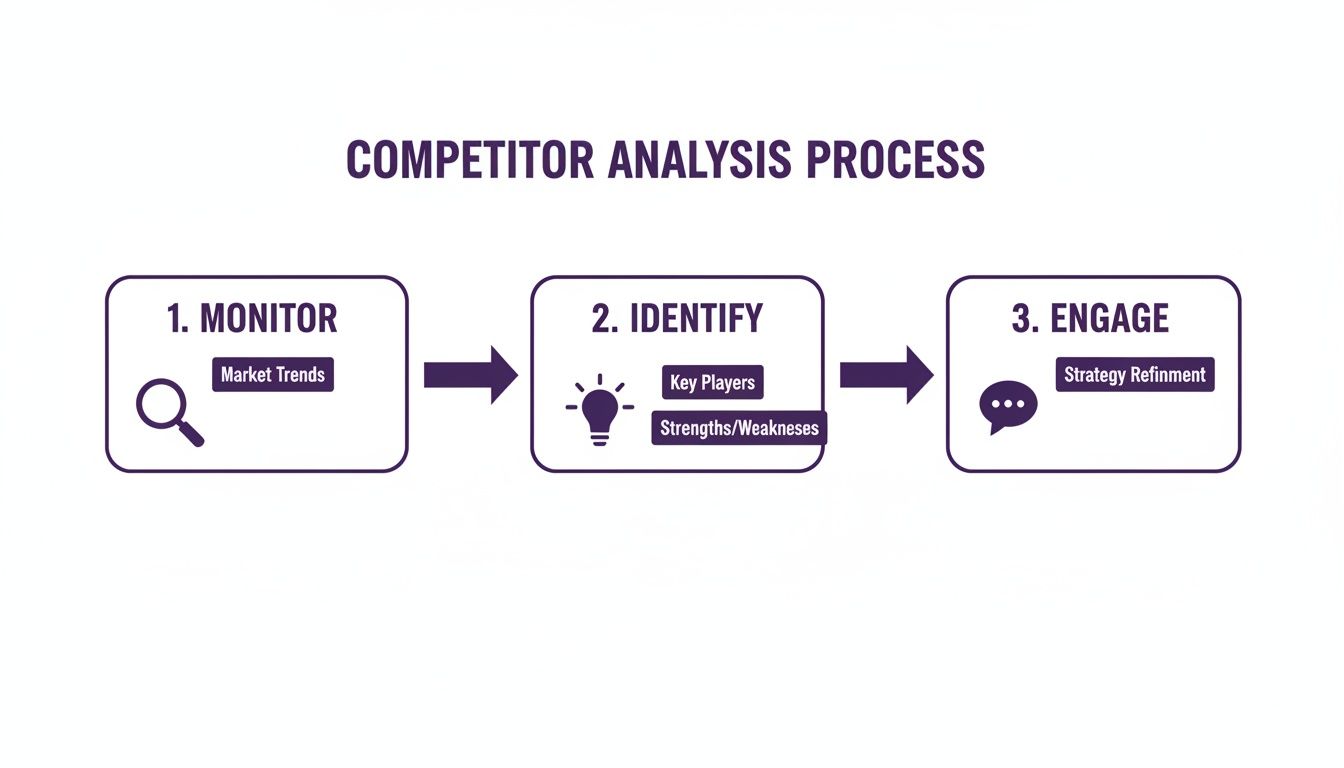
This process flow highlights how systematic monitoring directly feeds into identifying actionable leads, which can then be engaged through an automated system.
Creating a Predictable Pipeline
When you combine a powerful discovery tool (X advanced search) with an intelligent outreach engine, you create a predictable pipeline. You know that every day, your saved searches will surface new prospects, and your automated campaigns will engage them.
This completely changes the dynamic of your growth strategy.
- You're no longer dependent on inbound luck.
- You're not wasting hours on manual, repetitive tasks.
- You have a consistent flow of new conversations entering your pipeline every single day.
This system turns advanced search on Twitter from a simple research technique into a core component of a scalable, automated lead generation machine. You’re not just finding data; you’re turning it directly into revenue-generating opportunities.
Frequently Asked Questions
You've got the tools and the templates down, but a few questions always pop up when you start building a real lead generation system with advanced search on Twitter. Let's walk through the ones I hear most often so you can get started without any guesswork.
How Often Should I Run These Searches for New Leads?
When you're actively looking for leads, you need to be consistent. I make it a habit to run my core 'pain point' and 'competitor mention' searches every single day.
Buying signals on X can be incredibly short-lived. A quick, timely DM can be the difference between kicking off a great conversation and showing up way too late to the party.
For more general market research, like keeping an eye on a competitor's content, once a week is usually enough. The best trick here is to save your most valuable searches right on X. This turns what could be a huge chore into a simple five-minute daily habit.
Can I Really Automate Outreach Without Sounding Like a Robot?
Yes, you absolutely can, but it all comes down to using the right tool. The old way of "automating" DMs was just blasting out the same generic, copy-pasted message to everyone. That's exactly why it got such a bad name—it's lazy and it just doesn't work.
But modern tools like DMpro work completely differently. They're designed to scan a prospect's profile, looking at their recent tweets, stated interests, and even their bio. Then, they intelligently weave that context into your opening message. You provide the strategy and the basic message framework, and the tech handles the personalization for you.
The goal isn't just to send a message; it's to start a conversation. Real personalization, even when automated, feels genuine and relevant, which is what drives replies.
This lets you open a conversation based on something real—like a tweet they just posted or a shared interest you noticed. That's how you build actual connections.
What Are the Biggest Mistakes to Avoid With Advanced Search?
By far, the most common mistake is being way too broad with your search terms. If you just search for a single keyword like "marketing," you'll be buried under an avalanche of irrelevant noise. The magic happens when you start layering multiple operators to get super-specific results.
Here are the top three pitfalls I see people fall into:
- Forgetting Negative Filters: Every single one of your queries should include negative keywords (
-job,-hiring) and filters (-filter:retweets) to clear out the junk. This is the single fastest way to clean up your search results. - Giving Up Too Soon: Your first attempt at a query probably won't be perfect, and that's okay. Don't get discouraged. Keep tweaking it, add another filter, remove a keyword, and refine it until you're seeing a steady stream of high-quality leads. Think of it as an ongoing experiment.
- Having No Plan to Act: Finding a great lead is only step one. The power of advanced search is totally wasted if you don't have an efficient way to actually engage with the people you find. You need a process for that initial outreach, the follow-up, and tracking everything.
Steering clear of these common mistakes will put you way ahead of the curve, helping you turn X into a reliable, predictable engine for qualified SaaS leads.
If you’re tired of manually sending DMs every day, try DMpro.ai — it automates outreach and replies while you sleep.
Ready to Automate Your Twitter Outreach?
Start sending personalized DMs at scale and grow your business on autopilot.
Get Started Free