
Your Guide to a Blank Twitter Post Template That Wins Leads
Stop guessing. This guide shows you how to use a blank twitter post template to start real conversations and generate high-quality SaaS leads on autopilot.
Ever stare at that blinking cursor on X, completely stumped? We've all been there. You know you need to be on X to find customers and build your SaaS, but the daily grind of coming up with something valuable to say is exhausting.
That's where a simple blank Twitter post template comes in. Think of it less as a restrictive script and more as a proven blueprint for lead generation. It’s a pre-built structure that lets you plug in the right details, saving you from that dreaded "what do I tweet?" paralysis.
Why a Blank Twitter Post Template Works
Using templates isn't about being lazy—it's about being efficient. As a founder, your time is your most valuable asset. A good template system is the secret to creating consistent, high-quality content that drives distribution without burning you out.

It’s your repeatable formula for posts that grab attention, start conversations, and, most importantly, bring in leads for your business.
The Power of Frameworks
This idea isn't new. Savvy marketers figured out years ago that repeatable post structures got more traction.
Fast forward to today, and that trend has exploded. Recent data from Hootsuite's social media statistics shows that average replies per post on X have shot up 107% year-over-year. This tells us one thing loud and clear: you have to craft posts that practically beg for a response.
This is what separates founders who are just shouting into the void from those who are starting real conversations with potential customers. A solid template strategy helps you turn your X account into a reliable lead machine by focusing on:
- Efficiency: Stop reinventing the wheel every day. Create killer content in minutes, not hours.
- Consistency: Keep a steady flow of valuable posts going out, keeping your audience hooked.
- Scalability: Build a system to ramp up your outreach and engagement without piling more work onto your plate.
The goal is to move from being a "content creator" to a conversation starter. Templates provide the structure; you provide the context. This shift is what unlocks real lead generation on X.
When you use a proven framework, you free up mental energy to focus on what really matters: personalizing interactions in the DMs.
For instance, once one of your templated posts gets a reply, a tool like DMpro can automatically send a personalized follow-up message. This kicks off a genuine one-on-one conversation without you lifting a finger. If you want to dig deeper, check out our guide on how to write a tweet that drives engagement.
Crafting Your Core Template for Maximum Engagement
A great blank Twitter post template is more than just a pre-written tweet. It’s a framework engineered to pull people into a conversation. The whole point is to design something that stops the scroll and gives them a genuine reason to reply.

This isn't about chasing vanity metrics like likes. It's about strategically building engagement to find leads. A well-designed blank template is one of the most effective tools to improve social media engagement because it gives your posts a repeatable structure for connection.
Think of these templates as reusable skeletons. Once you have a few solid ones, you can flesh them out with fresh content in minutes, each tailored to a specific goal like lead gen, audience building, or market research.
The Anatomy of a High-Performing Template
Every successful template I've seen comes down to a few key ingredients. If you get these right, you’re already doing better than 90% of the founders on the platform. The secret is to build a structure that always invites a response.
Here’s the basic blueprint:
- The Hook: Your opening line. Its only job is to stop the scroll. Use a controversial take, a surprising stat, or a problem your audience knows all too well.
- The Value or Question: Once you have their attention, deliver a quick, valuable insight or ask a simple, open-ended question that’s easy to answer.
- The Call to Action (CTA): Tell them what to do next. Ask for their opinion, encourage a retweet, or prompt them to send a DM.
This simple structure is effective because it mirrors a natural conversation. You grab attention, create a connection, and then invite them to join. For a deeper dive, check out our guide on boosting your Twitter tweet engagement.
Incorporating Interactive Elements
Static text only gets you so far. Interactive elements are what make your templates come alive—for your audience and the X algorithm.
The data backs this up. While the average click-through rate on X is around 1-2%, adding simple interactive features can dramatically change the game. Posts with polls, questions, or GIFs see a median of 6.5 interactions, a huge step up from other post types.
To give you a better idea, let's break down the core components you should be thinking about for your templates.
Key Components of a High-Engagement Twitter Template
| Component | Purpose | Example for Lead Gen | Example for Audience Building |
|---|---|---|---|
| The Hook | Grab immediate attention and stop the scroll. | "The #1 mistake most SaaS founders make with cold outreach is [common error]." | "Unpopular opinion: [Niche-specific belief]." |
| The Value/Question | Provide insight or pose a question to spark curiosity. | "Instead, try [actionable tip]. What’s your biggest sales challenge right now?" | "I think this because [brief reason]. What's your take on it?" |
| The Call to Action | Guide the user on what to do next. | "DM me 'SALES' and I'll send you a 3-step fix." | "RT if you agree, comment if you don't!" |
| Interactive Element | Boost engagement with polls, GIFs, or direct questions. | "[Poll] What's holding back your lead gen: A) Time or B) Strategy?" | "Describe your Monday using only a GIF." |
By building these elements into your blank templates, you're not just writing tweets; you're creating a repeatable system for starting conversations that drive results.
A template isn't just a pre-written tweet; it’s a repeatable system for starting conversations. The more interactive you make it, the more conversations you'll start.
Consider adding placeholders for these interactive pieces in your core templates:
- [Poll Question]: Fantastic for quick market research or sparking a debate.
- [GIF Response Request]: A fun, low-effort way for your audience to engage.
- [Open-Ended Question]: Perfect for uncovering pain points and qualifying potential leads.
When you build these components into your blank Twitter post templates, you create a system that consistently drives interaction and opens the door to new business.
Ready-to-Use Blank Twitter Post Templates for Founders
Theory is great, but let's get practical. You need frameworks you can grab, customize, and start using now to see results. Below are a few of my favorite, battle-tested blank Twitter post templates built for founders who need to generate leads, not just noise.
Think of each one as a launchpad. Plug in your own details, adjust the tone to sound like you, and get ready for the replies to roll in. These posts shift you from broadcasting content to starting conversations that turn into sales.
The Pain Point Identifier
This is my go-to for finding people who are feeling the exact pain your product solves. The psychology is simple: you start with a common struggle, show them you get it, and then open the door for a conversation.
The Template:
Struggling with [Common Problem]?
You're not alone. The hardest part is often [Specific Frustrating Detail].
What's the #1 thing holding you back from solving it?
Why It Works: It’s direct, empathetic, and gets right to their specific roadblock. The replies are pure gold—they not only tell you what your market is thinking but also act as a hand-raise from a potential lead. It’s a low-friction way to get prospects to identify themselves.
The Value-First Lead Magnet
This template is a classic for a reason. It’s about capturing leads by offering a genuinely helpful resource for free. Instead of a pushy sales pitch, you're leading with generosity. That builds trust and makes people far more likely to engage.
The Template:
- The Hook: "Just finished putting together a [Resource Type] on [Topic]."
- The Tease: "It covers [Benefit 1], [Benefit 2], and how to avoid [Common Mistake]."
- The CTA: "Who wants a copy? Comment '[Keyword]' below and I'll DM it to you."
This simple structure turns your post into a lead-capture engine. When someone comments with your keyword, you can use a tool like DMpro to automatically send them the resource in a personalized DM. This instantly kicks off a private conversation where you can learn more about them and see if they're a good fit for your SaaS.
Need more ideas? Take a look at these examples of tweets that follow similar value-first principles.
The Authority & Conversation Starter
This one is less about direct lead gen and more about positioning. It’s designed to help you engage with industry leaders or jump into trending conversations in a meaningful way. It shows you’re a thoughtful player in your space, not just another founder selling something.
The Template:
Great take on [Industry Topic] by [@Influencer].
One thing I'd add is [Your Unique Insight or Question].
Curious what others think—am I missing something?
Why It Works: First, you're showing you pay attention to your industry. Second, you’re adding real value to an existing conversation. Tagging an influencer can get you on their radar, and the open-ended question invites everyone else to chime in, massively expanding your reach.
The core idea behind all these templates is starting a dialogue. While this is about Twitter, the principles are universal. You can find similar ideas in these 8 cold email example templates that actually get replies that also focus on opening a conversation, not just closing a deal.
Scaling Your Outreach Beyond Single Posts
<iframe width="100%" style="aspect-ratio: 16 / 9;" src="https://www.youtube.com/embed/bZaKKiu9TEY" frameborder="0" allow="autoplay; encrypted-media" allowfullscreen></iframe>Having a few high-performing templates is a great start. But real growth happens when you build a system around them. Manually hunting for conversations and sending DMs one by one is a recipe for burnout.
To truly scale your SaaS distribution, you have to create an automated workflow. This is where you connect your proven templates to a machine that can run your outreach on autopilot.
Building Your Outreach Machine
The first mental shift is to stop hunting for leads and start attracting them. Your templates already do the heavy lifting by flagging people with specific problems. But what happens after someone engages? If the answer is "I manually send them a DM," you're leaving a massive opportunity on the table.
This is where a tool like DMpro becomes your sales co-founder. You set up a campaign that automatically finds people matching your ideal customer profile. Then, it engages them with personalized DMs based on the very templates you already know work.
It’s a simple change—moving from manual tasks to automated systems—that separates founders scrambling for leads from those with a predictable pipeline.
This process is about making your templates work together as a system to identify prospects, offer value, and then engage them.
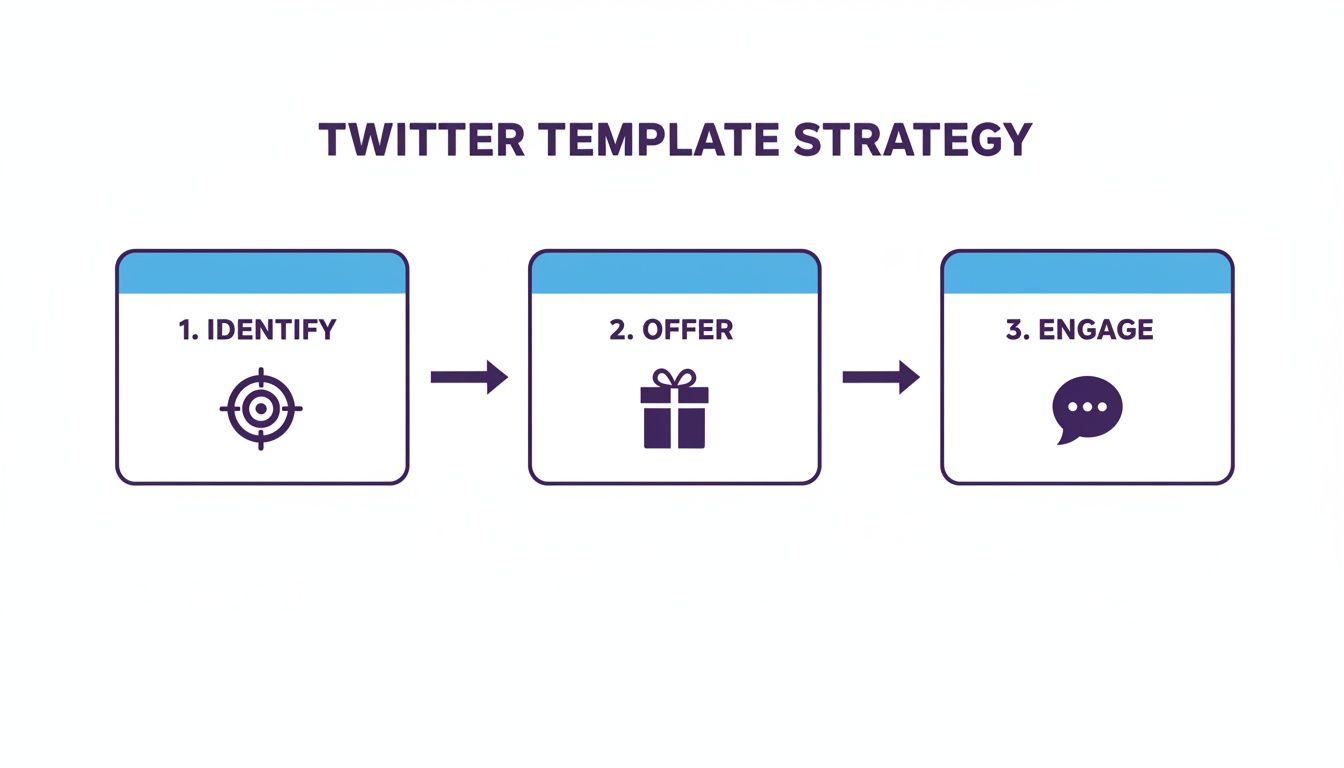
As you can see, a template isn't just a single post. It's a critical step in a much larger lead generation strategy.
Automation and The Modern X Playbook
The need for automation is more critical than ever. The evolution of the blank Twitter post template is tied to X's growth into a serious B2B channel.
With a projected 421 million users by 2026 and 500 million daily tweets, manual outreach is like trying to find a needle in a continent-sized haystack. Before 2022, most template usage was manual. But after the acquisition, when organic B2B interactions dipped, AI-driven automation became essential. A solid 16% of marketers still call X their top channel for ROI, and that success is fueled by smart, template-driven strategies.
Your goal isn't just to send more DMs. It's to start more of the right conversations with the right people, consistently and predictably.
This is exactly what automation unlocks. With a platform like DMpro, you can define your ideal customer, launch a campaign, and let the system take over. It can find hundreds of targeted leads for you daily, achieving response rates of 25-40% by sending highly personalized messages at scale.
This approach turns your templates from static documents into active, 24/7 lead-generating assets. You're no longer just posting. You're running a sophisticated outreach engine that works for you while you focus on building your product and talking to warm leads.
Our article on how to schedule posts on Twitter can help you maintain that crucial consistency.
Measuring Success and Refining Your Templates
You can't improve what you don't measure. Throwing templates out there without tracking what works is pure guesswork. If you're serious about building a predictable lead pipeline on X, you have to get real about the numbers that actually drive your business forward.

It’s easy to get distracted by vanity metrics like likes and retweets. They feel great, but they don't pay the bills. The entire point is turning engagement into qualified leads, which means focusing on data that reflects real business outcomes.
Key Metrics That Actually Matter
Forget the noise. Zero in on the data that proves your templates are generating leads. A simple spreadsheet is all you need to get started.
For every template you test, I recommend tracking these key performance indicators (KPIs):
- Reply Rate: The percentage of people who reply to your post. A direct measure of how well your hook starts a conversation.
- DMs Initiated: How many private conversations did the post spark? This is a critical hand-off into your sales funnel.
- Positive Reply Rate in DMs: Out of all DMs sent, what percentage got a warm, engaged response? This tells you if your follow-up is hitting the mark.
- Leads Booked: The big one. How many actual sales calls or demos did this template generate? This ties social media activity directly to revenue.
Chasing likes is a founder's trap. Chasing conversations that lead to demos is a founder's strategy. Focus on the metrics that reflect real intent.
This data-first mindset shifts your strategy from "I hope this works" to a repeatable process. You’ll quickly spot which blank twitter post template is a winner and which ones need to be retired.
A Simple Framework for A/B Testing
Once you start tracking the right things, you can refine your templates with simple A/B tests. The idea is to change just one element at a time to see what moves the needle.
For example, you could test:
- Hook Style: Does a question get more replies than a surprising stat?
- Call to Action: Does "Comment" work better than "DM me"?
- Media: Does adding an image or GIF boost your reply rate?
Here's how to do it: run one version for a week, log the results, then run the tweaked version the next week. After a month, you'll have solid data showing what resonates with your audience.
This cycle of testing, measuring, and refining is what separates founders who get lucky on X from those who build a consistent, scalable lead-gen machine.
When you bring an automation tool into the mix, this feedback loop gets even tighter. With a tool like DMpro, you can run two different DM campaigns using template variations and directly compare the positive reply rates. This lets you double down on the winning message fast, ensuring your pipeline is always full.
Got Questions About Using Twitter Templates?
If you're just getting started with blank Twitter post templates, you probably have a few questions. That's normal. Let's run through the most common ones I hear so you can get going with confidence.
Think of this as your quick-start FAQ for using templates the right way.
Will Using Templates Get My Account Suspended?
This is the big one. The short answer? No, not if you're smart about it.
The key is personalization at scale, not spam. X's spam filters are looking for accounts blasting out identical, low-value messages. That’s not what we’re doing. A good template is a starting point, a framework you fill in to make each post or DM feel personal. The goal is to make every interaction feel like a genuine one-on-one chat.
How Many Different Templates Should I Have?
You don't need a huge library. Creating too many templates right away is a classic mistake that just creates confusion.
I always suggest starting with just 3-5 core templates. Tie each one to a specific goal:
- A template to pinpoint a prospect's main challenge.
- One for sharing a genuinely helpful resource (your lead magnet).
- Another for jumping into conversations with industry influencers.
It's much better to have a handful of battle-tested templates you know inside and out than a dozen mediocre ones. Quality over quantity, always. You can build out your collection later as you see what’s connecting with your audience.
What's the Best Way to Move from a Public Post to a DM?
Making the leap from a public reply to a private DM has to feel smooth, not like a sudden sales pitch. When someone engages with your templated post, reply to them publicly first. Thank them or answer a quick question right there.
After that initial public acknowledgment, you can slide into their DMs.
Here's how that transition can sound: "Great point! I actually have a resource that dives deeper into this, mind if I send it over?" or "Glad that resonated with you. Sounds like you're focused on [Their Apparent Goal]. Might be worth a quick chat about it?"
This simple, two-step approach makes the shift from public to private feel completely natural. It shows you're paying attention and opens the door for a real conversation.
If you’re tired of manually sending DMs every day, try DMpro.ai — it automates outreach and replies while you sleep.
Ready to Automate Your Twitter Outreach?
Start sending personalized DMs at scale and grow your business on autopilot.
Get Started Free