
Unlock Growth with Twitter Message Requests: A Founder's Guide to Lead Gen
Turn message request twitter into a powerful lead funnel. Learn to craft DMs that get accepted and scale outreach without getting ignored.
Ever wondered what a Twitter message request is? It's basically a separate inbox for DMs you get from people you don't follow. Think of it as a waiting room—it keeps your main inbox clean while holding onto messages that could be your next big opportunity.
For any founder doing outreach on X, this is where nearly every cold conversation starts.
What Is a Twitter Message Request?

As a founder, your time is everything. That message request folder isn't just a spam filter; it's an unfiltered feed of potential leads, partners, and customers waiting for you to take a look.
Here’s the breakdown: when someone you follow DMs you, it goes straight to your main inbox. Simple. But when someone you don't follow messages you, it gets sent to the request folder. You get a notification, but the conversation doesn't start until you hit "Accept."
This simple separation is what makes cold outreach on the platform possible.
The Gateway to Cold Outreach
This "waiting room" system is the foundation of cold outreach on X. Back in 2013, Twitter opened up DMs to everyone, not just mutuals. This created a huge opportunity for founders and sales teams to connect with pretty much anyone.
This is why outreach campaigns using tools like DMpro often see response rates of 25-40%. They're sending highly personalized openers at scale, all landing in that request folder.
That initial barrier is key. It gives users control over their inbox, which means your first message has to be good enough to earn its spot. It's the first—and most important—step in turning a cold prospect into a warm lead.
If you’re serious about lead generation, learning how to write a message that gets accepted is everything.
Key Takeaway: Your message request folder isn't a junk drawer. It's the front door for every new business opportunity from people who haven't followed you yet.
If you're new to this, it helps to get the basics down. Our guide on what a DM is on social media is a great place to start. The goal isn't just to send messages—it's to get them accepted and start a real conversation.
How to Find and Manage Your Message Requests

Your next big opportunity could be sitting in your message requests. But you have to know where to find them. Leaving that folder unchecked is like leaving money on the table.
Luckily, finding these DMs is simple once you know the drill.
Navigating to Your Requests on Desktop
On your computer, getting to your Twitter message request folder is a quick two-click process. It's designed to be painless, so you can easily weave it into your daily workflow.
Here’s how:
- Click the envelope icon in the left-hand menu. This opens your main inbox.
- At the top of your inbox, you’ll see a tab labeled “Message requests.” Click it, and you're in.
That's it. Now you can see every message from people you don't follow, all in one place.
Finding Requests on the Mobile App
The steps are pretty much the same on the X mobile app for iOS and Android, which is great for checking leads when you’re on the go.
- Tap the envelope icon in the bottom navigation bar.
- Look at the top right, just under the search bar, and tap on “Message requests.”
You'll see the same list of pending conversations. The trick is to get in the habit of checking this folder regularly, because X doesn’t always send a loud notification for every new request.
Accept, Delete, or Report: What to Do Next
Once you're in your requests, you have three options for each message. Think of it as triaging inbound interest so you can focus on what matters.
- Accept: This is for promising leads. Accepting moves the message to your main inbox, and the real conversation can begin. The sender will also see that you've read their DM.
- Delete: If a message is irrelevant or from a bot, just delete it. The conversation is gone, and the sender is never notified.
- Report: Use this for actual spam, scams, or abusive messages. Reporting helps keep the platform clean for everyone.
Getting a handle on your requests is a huge part of making your outreach effective. To learn how to make your own messages land well, check out our guide on how to send a DM on Twitter.
Why Your DMs Are Landing in the Request Folder
Ever send a perfect DM, only for it to vanish? It's not bad luck; it’s X’s system working as designed. Understanding why your message lands in a Twitter message request folder is the first step to making sure your outreach gets seen.
The biggest reason is simple: mutual follows. If you and your prospect follow each other, your DM goes straight to their main inbox. If not, X sends it to their request folder to be screened.
Think of it like knocking on a stranger's door. Without that existing connection, you have to wait for them to decide if they want to let you in. This is the default setting for most accounts.
When Privacy Settings Put Up a Wall
While the follow relationship is the main gatekeeper, a user's privacy settings can stop your outreach cold. Everyone on X can choose who is allowed to DM them.
Here are the three options a user can choose from:
- Everyone: This is the most open setting. If someone allows DMs from everyone, your message will land in their request folder.
- Verified users only: This is becoming more common. If a user chooses this, only accounts with a blue checkmark can send a message request. If your account isn't verified, your DM won't go through.
- People you follow: This is the most restrictive setting. Someone with this setting only gets DMs from accounts they follow. There's no message request folder to land in—your message just won't be delivered.
Knowing these settings is a game-changer. Before a big outreach campaign, scout the settings of a few key targets. If you notice they only accept DMs from "Verified users only," you might need to focus on public engagement first.
Building a Smarter Outreach Strategy
Once you get these rules, you can build a much smarter outreach plan. Instead of just firing off DMs, you can tailor your approach.
Start by engaging with their public content. Reply to their posts, add value to their conversations, and get on their radar. Once they recognize your name, they're far more likely to accept your message request when you finally send it.
For founders trying to scale this, managing it all by hand is a nightmare. This is where a tool like DMpro is incredibly helpful. It handles the automated part of your outreach while you focus on that crucial warm-up engagement, giving your DMs the best shot at being seen and accepted.
Turning Message Requests Into a Powerful Lead Funnel
Your message request folder isn't just a waiting room. It's an overlooked goldmine for generating inbound and outbound leads. With the right strategy, you can turn this hidden corner of X into a scalable sales machine.
The secret is to move away from the generic, copy-paste messages everyone else sends. Your goal is to write an opening line so personal and relevant that the recipient has to hit "Accept." That means doing your homework—mention a recent post, bring up a shared interest, or connect their work to a problem you solve.
This flowchart shows exactly where your message lands. It’s a simple process, but the destination makes all the difference.
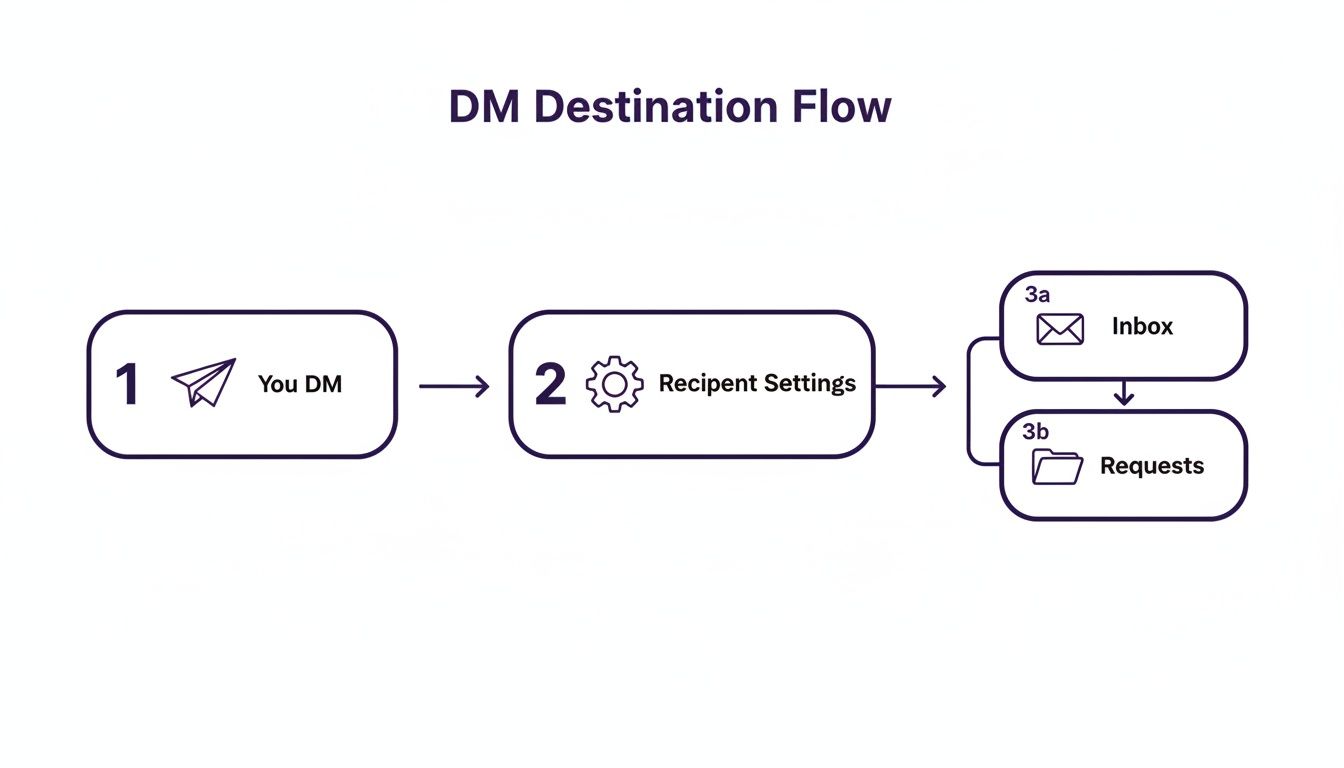
As you can see, the recipient’s settings are the gatekeeper. Your first impression is everything.
Crafting the Perfect Opening Line
When someone sees a Twitter message request, they’re asking one question: "Is this worth my time?" Your job is to make the answer an immediate "yes." Ditch the hard sell and aim for a genuine connection.
Here are a few angles that get results:
- Reference Their Content: "Loved your thread on scaling SaaS distribution. That point on product-led growth really hit home."
- Highlight a Shared Interest: "Saw you're into AI-driven marketing. As a fellow founder in the space, I was curious to hear your take on..."
- Offer Specific Value: "Noticed you're hiring for a new sales role. We built a tool that helps teams automate lead gen on X, and I thought it might be helpful."
The key is showing you've done 60 seconds of research. That small effort separates you from 99% of automated spam. This personalized approach is similar to what makes a human-first SMS chat bot so effective—it starts a real conversation.
Automating Personalization at Scale
Doing this by hand for a few people is easy. But if you're building a serious pipeline, it's impossible to scale. That's where outreach automation comes in.
A platform like DMpro, for example, is built to automate this kind of personalized outreach. It can send messages that feel human by automatically referencing a prospect's recent tweets or bio details. This lets you connect with hundreds of ideal customers a day without losing that personal touch. You can dive deeper into the basics in our guide to messaging on Twitter.
Message requests on X are an essential channel for business. When the platform hit 237.8 million daily active users in 2022, DMs became the go-to place for real conversations. Since B2B conversion from general X traffic is a low 0.69%, well-crafted DMs are your best shot at qualified leads.
Once they accept, the conversation has just begun. Don't pivot to a sales pitch. Ask thoughtful questions. By turning a cold outreach into a warm discussion, you convert that initial Twitter message request into a real lead.
Common Mistakes That Get Your DMs Ignored
Getting your message into someone's Twitter message requests is only half the battle. The real trick is getting them to read it, not just hit delete. After sending thousands of DMs to grow my own business, I've seen every mistake—and most are easy to avoid.
You've got about three seconds to make a good impression. If your message or profile sets off any alarms, you're done. The good news? Dodging these pitfalls is simple once you know what they are.
Using Generic Copy-Paste Templates
This is the number one killer of outreach campaigns. A generic, one-size-fits-all message screams "spam!" People can spot a template a mile away and will hit "Delete" without a second thought.
- The Mistake: "Hey, I saw your profile and thought you'd be a great fit for our service. Are you free for a quick chat?"
- The Fix: Personalize it. Mention something specific from their bio, a recent tweet, or a shared interest. Show them you invested 30 seconds of your time.
That little bit of effort changes everything.
Selling Too Hard, Too Soon
Here's another classic mistake: jumping straight into a hard sales pitch. Your first message isn't the time to demand a demo or shove a link in their face. It's about starting a conversation.
Your goal for the first message is simple: earn a reply. That’s it. Focus on sparking curiosity or providing value, not on making a sale.
Instead of asking for their time, offer something valuable with no strings attached. It could be a useful insight, a compliment on their work, or a question about a topic they care about. Give before you ask.
Having a Weak or Untrustworthy Profile
This one gets overlooked all the time. Your DM could be perfect, but if they click your profile and see a blurry photo, an empty bio, or a spammy feed, you're finished. Your profile is your digital handshake.
A sketchy profile tells them you're either not a serious professional or a bot. Before you send a single DM, get your own house in order. Use a clear headshot, write a bio that explains who you are and who you help, and have a feed that reflects your expertise.
Manually personalizing every message while keeping your profile polished is a huge time-suck for founders. This is where a tool like DMpro can be a game-changer. It automates sending personalized openers that reference a prospect's actual tweets or bio, making sure your messages feel human and helping you sidestep that generic template trap at scale.
How to Safely Automate Your Twitter Outreach
<iframe width="100%" style="aspect-ratio: 16 / 9;" src="https://www.youtube.com/embed/_tcJcjRvB2U" frameborder="0" allow="autoplay; encrypted-media" allowfullscreen></iframe>Let's be real: sending personalized DMs one by one is a massive time sink. It just doesn't scale. Smart automation is the only way to grow, but I get it—many founders worry about putting their accounts at risk.
Nobody wants their main profile flagged for trying to build a lead pipeline.
The good news is that modern tools aren't the spam bots of the past. They're designed to work with X's rules by mimicking how a real person would act.
For any outreach, collecting the right data is the first step. Understanding best practices, like using proxies for web scraping data, helps your activities look more natural and avoid red flags.
Mimicking Human Behavior to Stay Safe
The point of safe automation isn't just speed; it's consistency. Think of it as sending a steady, natural stream of targeted messages that feel like you wrote each one by hand.
This is what platforms like DMpro are built for. They have smart features designed to keep your accounts safe:
- Inbox Rotation: Instead of blasting messages from one account, your DMs are spread across multiple profiles. This makes the activity look completely organic.
- Multi-Account Management: You can run your whole team's outreach from a single dashboard, ensuring everyone follows the same safe process.
- Automatic Limit Respect: The system knows and respects X's daily sending limits. It automatically pauses and restarts campaigns to keep every account in good standing.
This isn't about spamming. It's about building a predictable lead generation engine that works 24/7, sending hundreds of personalized DMs that start real conversations.
When you use tools that put safety first, you can scale your outreach without looking over your shoulder. You can learn more in our guide to automated direct messages on Twitter. It’s how you turn your Twitter message request strategy into a sales funnel you can rely on.
Still Have Questions About X Message Requests?
We’ve covered the ins and outs of message requests, but you might still have a few questions. Let's tackle some of the most common ones we hear from founders.
How Many DMs Can I Actually Send Each Day?
On X, an unverified account has a limit of around 500 DMs per day. If you're verified, that number is much higher.
But here’s the thing: hitting the maximum isn't the goal. Consistency is key. Sudden, massive spikes in DM activity are a huge red flag for spam filters.
This is where a tool like DMpro is useful. It automatically paces your outreach and can spread the workload across several accounts. This keeps you safely under the radar while your campaigns run.
If I Delete a Message Request, Will the Sender Know?
Nope. When you delete a request, it just vanishes. On their end, it will look as if you never read the message. It's a discreet way to clean out irrelevant DMs.
What Happens if I Block Someone? Does That Get Rid of Their Message Request?
Yes, blocking someone immediately removes any message request they've sent. It's a more permanent solution than just deleting.
Once you block them, they can't send you more DMs, see your posts, or interact with you at all. It cuts off all communication.
Is There a Way to Turn Off Message Requests Altogether?
You can't get rid of the "Message requests" folder, but you can control who gets to DM you.
In your privacy settings, you can choose to only allow DMs from:
- People you follow
- Verified users only
This will stop most unsolicited messages from ever reaching you.
However, if you're using X for lead generation, keeping your DMs open to everyone is the right move. You want to make it as easy as possible for potential customers and partners to get in touch.
If you’re tired of manually sending DMs every day, try DMpro.ai — it automates outreach and replies while you sleep.
Ready to Automate Your Twitter Outreach?
Start sending personalized DMs at scale and grow your business on autopilot.
Get Started Free