
How to Schedule a Post on Twitter and Scale Your SaaS
Learn how to schedule a post on Twitter (X) with this founder-to-founder guide. Discover the best tools, times, and strategies to automate your content.
Want to schedule a post on Twitter? You’ve got two main routes. The simplest is using Twitter's built-in scheduler. Just write your tweet, click the calendar icon, pick your time, and you’re set. The other option is a third-party tool, which we'll cover in a bit.
As a founder, scheduling isn't just a time-saver; it's a core part of scaling your distribution. It lets you plan content in advance, keeping your profile active and generating leads without you being glued to your screen 24/7.
Why Scheduling Posts on Twitter Is Non-Negotiable
Let's be real—as a founder, your time is your most valuable asset. Manually posting on Twitter every day isn't sustainable when you're also building a product and talking to customers. Trying to remember to tweet at the "perfect" time is a recipe for burnout.
This is where scheduling stops being a nice-to-have and becomes a fundamental part of your growth engine. It’s about reclaiming your time and turning your Twitter presence into a reliable, automated asset instead of a constant chore.
This is Twitter's native scheduler. It’s a simple feature that shifts you from reactive, last-minute posting to a proactive, planned content strategy.
Build a Consistent Brand Presence
The Twitter algorithm rewards activity. When you show up consistently with valuable content, you're signaling that your account is worth paying attention to. This builds momentum that pulls in new followers and keeps your current audience engaged, making them more receptive to your outreach.
Scheduling makes this consistency possible. A planned content calendar lets you:
- Maintain a Constant Presence: Your profile stays active even when you're in meetings or sleeping.
- Engage Global Audiences: Schedule posts to go live when your customers in different time zones are online.
- Free Up Mental Bandwidth: My favorite part. Batch-create a week's worth of content in one go, schedule it, and get back to building your business.
Fuel Your Lead Generation Engine
Think about this: over 9,000 tweets fly out every second. Scheduling is how you cut through that noise. Accounts that tweet a consistent 3-5 times a day see their engagement and visibility climb significantly.
This is especially powerful if you're automating outreach. By scheduling posts, you keep your profile active and credible, which perfectly complements tools like DMpro that send personalized DMs for you. It warms up prospects before your message even hits their inbox.
The goal isn't just to be active; it's to be strategically active. Your scheduled posts create a trail of credibility that supports your direct outreach, making your cold DMs feel warmer and more relevant.
A solid scheduling habit turns your Twitter account into a vital piece of your SaaS distribution machine. To learn more about this, check out our guide on building an effective marketing strategy for Twitter.
Choosing Your Scheduling Tool: Native vs. Third-Party
When you decide to schedule posts on Twitter, you have two choices: use Twitter's built-in scheduler or a dedicated third-party platform. Both get the job done, but they're built for completely different scales.
Think of the native scheduler as a basic screwdriver. It’s free, it's right there, and it does one job well. It's perfect if you're just starting out and need to schedule a few tweets.
But if you're serious about scaling your SaaS on Twitter, you'll outgrow that screwdriver fast.
When to Graduate to a Third-Party Tool
This is where platforms like Buffer, Hootsuite, or Planable come in. They don't just schedule posts; they give you a command center for your entire content strategy.
The most game-changing feature is the content calendar. Instead of a simple list, you get a visual overview of your week or month. This makes it easy to spot gaps, balance your content themes, and drag-and-drop posts if plans change.
The native scheduler lets you set a time. A third-party tool lets you build a strategy. You stop thinking tweet-by-tweet and start planning your entire content engine.
Another huge win is bulk scheduling. Imagine writing 30 tweets in one session, uploading them in a spreadsheet, and having your entire month's content scheduled in minutes. This is a level of efficiency the native tool can't offer, freeing you up to focus on product and sales.
For a deeper dive, you can learn more about how to schedule tweets on Twitter and explore different methods.
Scheduling Method Comparison: Native vs. Third-Party Tools
To make the choice clearer, here’s a breakdown of the key differences between Twitter's scheduler and a dedicated social media tool.
| Feature | Native Twitter Scheduler | Third-Party Tool (e.g., Buffer, Hootsuite) |
|---|---|---|
| Cost | Free | Usually a monthly subscription (often with a free tier) |
| Content Calendar | None (just a list of scheduled tweets) | Visual, drag-and-drop calendar view |
| Bulk Scheduling | Not supported | Yes, often via CSV upload |
| Analytics | Basic native analytics | In-depth performance reports, best time to post suggestions |
| Team Collaboration | No shared access or approval workflows | Yes, with roles, drafts, and approval queues |
| Multi-Account | Clunky; requires logging in and out | Seamlessly manage multiple social profiles from one dashboard |
While the native scheduler is fine for casual use, a third-party tool is built for a strategic, scalable approach to distribution.
Beyond Scheduling: Core Business Functions
For founders, Twitter is a channel for generating leads and driving revenue. This is where the gap between the two options becomes a chasm.
Advanced tools are packed with features tied to business goals:
- Advanced Analytics: Track which posts drive clicks to your site, measure follower growth, and identify top-performing content.
- Team Collaboration: Let multiple team members draft, review, and approve content from one dashboard.
- Multi-Account Management: Juggling a personal brand and a company account? A third-party tool makes it a non-issue.
The bottom line is, while Twitter's scheduler is a great start, anyone focused on scalable growth will need to upgrade. The same logic applies to outreach. Manually sending DMs works at first, but to truly scale lead generation, Twitter automation is the next logical step.
Finding the Best Times to Post for Your Audience
So, you’ve picked a scheduling tool. Great. Now for the million-dollar question: when should your posts go live?
Posting consistently is half the battle, but posting when your audience is actually online is how you turn effort into results like leads and sales. It’s the difference between shouting into an empty room and starting a conversation in a packed one.
Start with the Data, Not a Guess
Let's cut the generic advice. You don't need to guess. Data shows that for a global audience, weekdays between 9 AM and 2 PM are generally a solid bet for engagement.
More specifically, Wednesday often peaks between 10 AM and 12 PM. If you want to dig into the numbers, you can learn more about the optimal time to tweet.
This is where a good tool makes all the difference. As this chart shows, third-party schedulers are built for a strategic approach, giving you the analytics to find your audience's peak times.
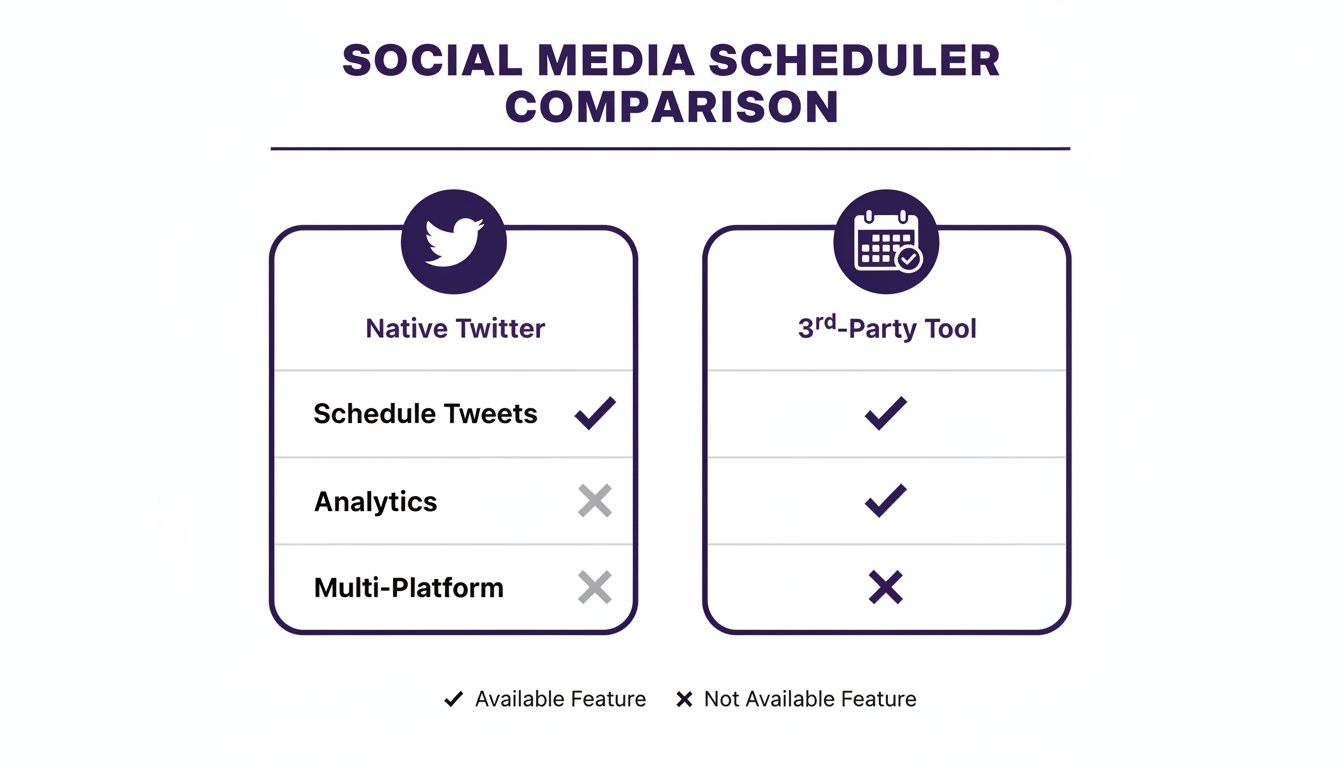
The built-in scheduler is fine for basics, but the real power comes from tools that offer deeper audience insights.
How to Pinpoint Your Audience's Active Hours
Those global averages are a starting point, but your specific audience might have different habits.
Maybe the SaaS founders you're targeting are night owls, or your ideal customers are in a different time zone. The goal is to find your peak hours.
Here’s how to dial it in:
- Dive into Your Analytics. Twitter's analytics show when your followers are most active. Most third-party tools bake this in, and it's gold. Look for patterns over the last month.
- Think Like Your Customer. If you're selling to VPs of Sales in North America, they're probably online during business hours. When do they check Twitter? Likely first thing in the morning and during their lunch break.
- Run Simple Tests. Schedule similar content at different times on different days. Post a tip at 8 AM on a Tuesday, then a similar one at 1 PM on a Thursday. Track the engagement for a few weeks and see which time slots win.
The best time to post isn't a static rule. It's a data point you uncover through testing. Start with general best practices, then refine your schedule based on your own results.
Why Timing is Rocket Fuel for Your Lead Generation
This obsession with timing directly impacts your lead generation.
For instance, some data points to 7-9 AM and 5-8 PM EST as prime slots. For founders using a tool to send automated DMs, this is crucial.
Pairing powerful outreach with scheduled posts that land during these high-visibility windows amplifies your entire strategy. A well-timed post can lead to 30% more retweets, making your profile look credible right when your message lands in a prospect's inbox.
A smart schedule ensures every post has the best chance of being seen by the right people, warming them up for the conversation you're about to start.
How Often You Should Actually Post on Twitter
<iframe width="100%" style="aspect-ratio: 16 / 9;" src="https://www.youtube.com/embed/RJ3ujlMYlus" frameborder="0" allow="autoplay; encrypted-media" allowfullscreen></iframe>We’ve covered when to post, but what about how often? It’s a tricky balance. Post too little, and you're invisible. Post too much, and you become background noise.
The goal is to find a content velocity that keeps your brand top-of-mind without annoying your audience. For most of us in the SaaS world, the sweet spot is pretty clear.
Finding Your Posting Cadence
Data suggests that for most brands, 3-5 posts per day is the ideal range. This keeps you visible in the feed on a platform that moves incredibly fast.
This regular activity signals to the algorithm that your account is active and valuable, boosting your visibility over time. It’s about creating a reliable rhythm.
Why Spacing Out Your Tweets Matters
Just as important as the number of posts is the timing between them. Dropping five tweets in an hour is a surefire way to get muted. Don't do it. Spread your scheduled content throughout the day.
A good rule of thumb is to wait at least 30-60 minutes between each post. This gives every tweet a chance to breathe and find its audience before the next one drops.
Your posting frequency isn't just about looking busy—it's about building a credible, authoritative presence. An active profile shows potential customers you're plugged into your industry, making any outreach you do feel much more genuine.
Connecting Frequency to Lead Generation
This is where consistent posting pays off as a lead generation engine. Brands that post 6-9 times per week see an 18% higher reach per post. That jumps to 24% for those posting 10+ times per week.
Once you hit 11+ weekly posts, you can see nearly triple the engagement. You can discover more insights about social media frequency to see how this plays out.
For founders using an outreach tool like DMpro, this is critical. An active, engaging profile is the perfect foundation for your DMs. When a prospect gets a message and checks your profile, they need to see a thriving account, not a ghost town. It builds instant credibility and makes them far more likely to reply.
Using Scheduled Content to Fuel Lead Generation
Once you’ve nailed your timing and frequency, it’s time to level up. Let's stop thinking about scheduling as just maintaining a presence and start using it as a true lead-generation machine. This is about making your public content and private outreach work together seamlessly.
The goal is to see scheduling as a way to warm up your entire target market at scale. You're building an automated system that primes potential customers before you even slide into their DMs.
Build Your Content Pillars
Stop posting random thoughts. The most effective accounts build their schedule around content pillars—the 3-5 core topics your brand is an expert in.
For a marketing automation SaaS, your pillars might be:
- Lead Generation Tactics
- Marketing Automation Deep Dives
- Sales Funnel Optimization
- Founder Productivity Hacks
Every post you schedule should connect to one of these pillars. This establishes you as an authority in a specific niche and makes your profile a go-to resource for your ideal customers.
Create an Evergreen Content Library
Some of your content is too good to be seen only once. This is where an evergreen library comes in. It’s a curated collection of your best, timeless posts—helpful threads, insightful stats, or useful frameworks.
By creating a "bank" of these winners, you can easily slot them back into your schedule every few months. It's a fantastic way to ensure new followers see your greatest hits while filling gaps in your calendar.
Your scheduled content should do more than just keep your profile active. It should actively warm up the exact people you're targeting in your outreach campaigns. Think of it as the air cover for your ground game.
Align Your Content with Outreach Campaigns
This is where the real magic happens. Your scheduled content should directly support your outbound outreach efforts.
Let's say you're using a tool like DMpro to run an automated outreach campaign targeting VPs of Marketing.
Your content schedule should mirror that campaign. For the weeks leading up to and during the campaign, schedule posts about:
- The challenges VPs of Marketing are facing.
- Trends in B2B marketing automation.
- A case study on how a similar company solved a key problem.
Now, when your automated DM lands in their inbox, there's a good chance they've already seen your content. Your name is familiar, your profile looks credible, and your message feels relevant. This alignment can dramatically increase your response rates. If you want to dive deeper, our guide on Twitter followers analysis has some great tips.
When done right, scheduling becomes a strategic weapon for scaling your SaaS.
Got Questions About Scheduling on Twitter? We've Got Answers
Once you start scheduling, a few questions always come up. Let's tackle them so you can build your content calendar with confidence.
As a founder, you need straight answers. Here’s what you need to know.
Can I Schedule Twitter Threads?
Yes, you can. Scheduling threads is built into the desktop version of Twitter. Just write your first tweet, click the '+' icon to add the next one, and repeat. Once you're done, hit the schedule button.
Most third-party tools also support threads, and their interfaces often make it much easier to edit and rearrange the entire sequence before it goes live.
Does Scheduling Posts Hurt My Engagement?
This is the big one. The short answer is no. There's zero evidence the Twitter algorithm penalizes you for using its native scheduler or a reputable third-party tool. What actually matters is the quality of your content and posting it when your audience is online.
If anything, scheduling helps engagement because it forces you to be consistent and strategic with your timing—two things the algorithm rewards.
How Should I Manage Schedules for Multiple Accounts?
Juggling multiple accounts with Twitter's native tools is a nightmare. This is where third-party platforms are essential. Tools like Buffer or Hootsuite give you a single dashboard with separate content calendars.
For founders scaling outreach, this is even more crucial. A specialized tool like DMpro is built for this, letting you run automated DM campaigns from multiple accounts simultaneously. It's how you scale outreach efficiently without constantly logging in and out.
How Far in Advance Should I Schedule My Posts?
For most founders, planning content one to two weeks out is the sweet spot. This gives you a comfortable buffer so you’re never scrambling, while still being flexible enough to react to current events.
Pro tip: Always leave a few empty slots in your weekly schedule. This gives you room to jump on trending topics or share a spontaneous thought. That real-time content is gold for building an authentic connection.
Start Automating Your Twitter Growth
The secret to winning on Twitter is consistency. When you schedule a post on Twitter, you're not just queuing up content; you're buying back time and building a reliable presence that keeps your audience engaged and your pipeline full.
This is how you move from being a slave to the timeline to being a strategist. It frees you up to focus on what actually moves the needle—building relationships and having conversations that turn into revenue.
Ready to streamline your entire social media workflow? Check out this guide on how to automate social media posts and save time for a deeper look at scaling your efforts.
If you’re tired of manually sending DMs every day, try DMpro.ai — it automates outreach and replies while you sleep.
Ready to Automate Your Twitter Outreach?
Start sending personalized DMs at scale and grow your business on autopilot.
Get Started Free