
How to Schedule a Twitter Post for Maximum Reach
Learn how to schedule a twitter post to save time, boost engagement, and grow leads using native and third-party tools.
As a founder, you know that time is your most valuable asset. So, how do you keep a consistent presence on Twitter without it eating up your entire day? You schedule a Twitter post. Whether you use the free, built-in scheduler on X or a third-party tool, this one habit is the secret to staying consistent, reaching your audience when they're most active, and freeing you up for the real work: growing your business.
Why Scheduling Twitter Posts Is a Growth Engine
Trying to manually post on Twitter every few hours is a fast track to burnout. More importantly, it pulls you away from the stuff that actually grows your SaaS. Scheduling your posts isn't just a time-saver; it’s the backbone of a smart Twitter strategy that actually generates leads and scales your distribution.

When you schedule content, you're essentially building a small content machine that works for you 24/7. This consistency keeps you top-of-mind with your followers and signals to the algorithm that your account is active and worth showing to more people.
The Power of Consistent Activity
Consistency is everything on Twitter. If you only post once in a blue moon, potential customers might think your brand is inactive. But a steady drumbeat of valuable content? That builds trust and authority.
Recent data shows the sweet spot for posting is around 3.91 tweets per day. This cadence signals you're consistently active without spamming your followers' feeds. You can dig into the findings on optimal post frequency to see how it breaks down.
Based on industry data, here’s a look at how posting more frequently can directly impact your reach.
Impact of Posting Frequency on Twitter Reach
| Posting Cadence (per week) | Average Increase in Reach per Post |
|---|---|
| 5-7 posts | ~5% |
| 8-14 posts | ~12% |
| 15-21 posts | ~20% |
| 22-28 posts | ~35% |
As you can see, the relationship is clear: more consistent, quality posts lead to greater visibility. This consistency is a win-win:
- Keeps the Algorithm Happy: The more you post (within reason), the more the algorithm favors you in your audience's feed.
- Sets Audience Expectations: Your followers start to know they can count on you for regular insights, which builds a loyal community.
- Covers All Time Zones: Scheduling lets you connect with customers across the globe, even while you’re asleep.
Pro Tip: A scheduled content calendar is the foundation of any good outreach strategy. When a prospect gets a DM from you, the first thing they do is check your profile. An active, authoritative feed makes them far more likely to hit reply.
Freeing Up Your Time for What Matters
The real magic of scheduling is the leverage it gives you. Instead of being glued to your phone, you can batch-create a week's worth of content in just a few hours.
This frees up your mind—and your calendar—for the high-impact work that moves the needle: product development, customer calls, or scaling your distribution channels.
It's the perfect setup for automated outreach, too. When your scheduled posts are attracting your ideal customers, a tool like DMpro can already be in their inbox starting the conversation. Your profile looks busy and professional, making your automated DMs feel that much more credible.
Scheduling Posts Natively on Twitter and X Pro
Alright, let's get tactical. The most direct way to start scheduling is by using the tools Twitter (now X) provides for free. It’s surprisingly capable for a built-in feature and is the perfect place to start without having to sign up for another paid service.
Think of the native scheduler as your first step toward building a consistent content rhythm. You can use it on the main X website or through X Pro (what we all used to know as TweetDeck), which is now bundled with the X Premium subscription. If you're a founder just beginning to systematize your content, this is honestly all you need to get your first month of posts queued up.
Using the Standard Web Scheduler
Scheduling a post right from the X website is about as simple as it gets. There are no confusing extra features, which is actually a benefit when you're just trying to get content out the door. You write your post, pick a time, and you're set.
Here's how it works:
- First, open the composer by clicking the big blue "Post" button, just like you would for a regular tweet.
- Next, write out your content. Add your images, GIFs, polls, or tag any relevant accounts.
- Look for the schedule icon at the bottom of the composer window—it looks like a small calendar with a clock face on it.
- Clicking that icon will bring up a menu where you can choose the exact date and time you want your post to go live.
- Once you've set the time, hit "Confirm." The main post button will change to "Schedule." Click it, and you're done. Your post is officially in the queue.
The real advantage here is simplicity. In just a handful of clicks, you can have a post ready to publish during peak engagement hours, even if you’re tied up in meetings or taking a much-needed break.
Need to see what you have planned? Just open the composer again and click on "Unsent Posts" to view your "Scheduled" tab. From there, you can edit or delete anything in your queue. For a more detailed look at these built-in options, our other guide on scheduling tweets directly on Twitter has you covered.
Managing Multiple Accounts with X Pro
If you're juggling more than one account—say, your personal founder profile and your company's official page—X Pro becomes your mission control. It gives you a single dashboard to manage and schedule content for multiple profiles, which is a huge time-saver.
For founders actively building both a personal and a company brand, X Pro is a must-have. It eliminates the constant, tedious cycle of logging in and out of different accounts, keeping you focused and efficient.
The actual scheduling process in X Pro is almost identical to the main website. You compose your post just the same, but the crucial difference is that you first select which account you want to post from before you hit the schedule button. This centralized view is perfect for making sure both your personal brand and your business are maintaining a steady, professional presence.
There is one major downside for those of us often away from our desks: you can't schedule posts from the native X mobile app. This is a significant limitation and one of the primary reasons founders start exploring third-party tools. For now, if you're sticking with Twitter's own ecosystem, scheduling is strictly a desktop affair.
Leveling Up with Third-Party Scheduling Tools
Twitter’s built-in tools are great for getting started. But eventually, if you're serious about lead generation and scaling distribution, you'll hit a wall. As a founder, I can tell you that the native features are fine for basic posting, but they don't help you scale. To save hours, not just minutes, you need to bring in the heavy hitters. This is where tools like Buffer or Sprout Social change the game.
These platforms aren't just glorified calendars for your tweets. They are complete command centers for your social media. Think of it as graduating from a simple to-do list to a sophisticated project management system designed specifically for your Twitter strategy.
This simple flowchart can help you decide which path makes the most sense for you right now.
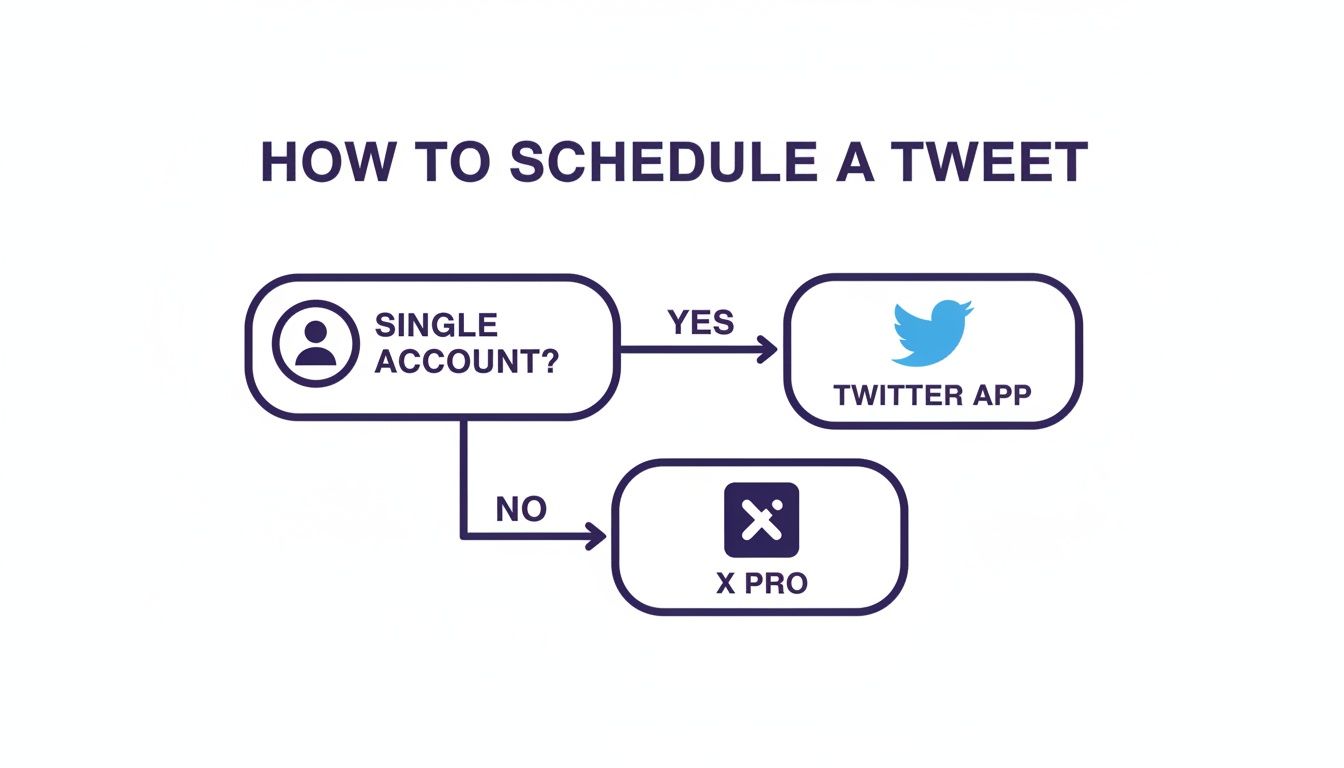
The bottom line? If you're a founder building a personal brand, the native tools will probably do the job. The moment you start managing a separate company page or just feel the drag of inefficiency, it’s time to upgrade.
Core Features That Change the Game
So, what do you actually get for your money when you switch to a dedicated tool? It boils down to two things: smarter automation and real data. You stop guessing and start making strategic moves backed by performance metrics.
Here are the features that truly make a difference for a growing SaaS:
- Bulk Scheduling: This is an absolute lifesaver. You can map out an entire month of content in a CSV, upload it in one click, and then forget about it. Imagine getting all your content done in one afternoon and spending the rest of the week on sales calls. That's the power of bulk scheduling.
- AI-Powered Timing: These tools don't guess. They analyze your account's past engagement to pinpoint the exact hours when your audience is most active.
- Advanced Analytics: Finally, see what’s actually working. Dive deep into click-through rates, follower growth, and individual post performance to see which content resonates. You can't improve what you don't measure.
- Content Recycling: Some of your posts are too good to only be seen once. These tools let you automatically re-queue your top-performing evergreen content, keeping your feed active and delivering value around the clock.
Native Scheduler vs Third-Party Tools
Feeling stuck on which path to take? This quick comparison should help you decide which scheduling method fits your current needs and future growth plans.
| Feature | Twitter Native Scheduler / X Pro | Third-Party Schedulers (e.g., Buffer) |
|---|---|---|
| Cost | Free | Paid subscription (usually with a limited free tier) |
| Account Management | Single account (Native) or multiple (X Pro) | Manages multiple accounts across various platforms |
| Bulk Scheduling | No | Yes, typically via CSV upload |
| Advanced Analytics | Basic engagement metrics | In-depth reports, trend analysis, and ROI tracking |
| AI-Powered Recommendations | No | Yes, for optimal posting times and content ideas |
| Content Recycling | No | Yes, with evergreen content queues |
While the native tools are free, third-party schedulers are an investment in efficiency and data-driven growth. They're built for founders who need to maximize their impact on the platform.
When to Make the Switch
You'll know it's time to upgrade when scheduling starts to feel like a chore that's holding you back. If you find yourself juggling multiple accounts or just want to build a predictable lead funnel for your SaaS, a third-party tool isn't a luxury—it's a necessity.
The real power isn't just to schedule a Twitter post; it's about creating a system. When your content runs on autopilot, you can focus on the conversations that content generates, which is where the real business happens.
Think about it this way: a consistent, high-value feed makes your automated DM campaigns infinitely more effective. When a prospect receives a personalized message from a tool like DMpro, their first move is to check your profile. Seeing a feed full of recent, insightful content builds immediate trust and dramatically boosts your reply rates.
If you’re ready to explore the different platforms out there, check out our complete guide on picking the right Twitter post scheduler for your business. It's all about finding the tool that saves you the most time so you can focus on growing faster.
Finding Your Best Time to Post for More Engagement
Putting out amazing content at the wrong time is like throwing a great party and forgetting to send invitations. You can spend hours crafting the perfect thread, but if you hit 'publish' when your ideal customers are offline, it’s just not going to connect. Moving from just scheduling posts to strategically scheduling them is a massive lever for growth.
So, what are these "golden hours"? General research from platforms like Hootsuite and Sprout Social can give us a baseline. They often point to weekday mornings, flagging 9-11 AM on Wednesdays, Thursdays, and Fridays as prime time. You can explore some of these engagement insights to get a broad feel for user habits.
The logic here is simple. The X feed heavily favors what's new. A tweet that gets a quick flurry of likes and replies in its first hour gets pushed to more people, creating a valuable snowball effect.
Why You Should Ditch the Generic Advice
But here’s the reality check for founders—generic data is a starting point, not your final strategy. Your audience of SaaS founders in North America doesn't keep the same online hours as e-commerce store owners in Europe. Your best time to post is completely unique to your followers.
The most valuable engagement data isn't in some industry report—it's waiting for you inside your own Twitter Analytics. Relying on someone else's "optimal times" is like using a map for a different city.
The great news is you don’t need to pay for a fancy tool to figure this out. X Analytics has everything you need. Just head to your analytics dashboard, click on the "Tweets" tab, and export your data. That spreadsheet is gold; it shows you every single tweet's impressions and engagement numbers, stamped with the exact date and time it went live.
Building Your Own Data-Driven Schedule
Once you have that spreadsheet open, start hunting for patterns. Are your 8 AM EST posts consistently outperforming your 3 PM posts? That’s your audience telling you exactly when they’re listening.
Here's a simple, actionable way to turn that data into a plan:
- Find Your Top 3 Time Slots: Look through your data and pinpoint the three one-hour windows where your tweets consistently perform the best.
- Spread Them Out: Don't jam all your best content into a single hour. Schedule your most important posts to hit these different peak times throughout the day to capture different segments of your audience.
- Rinse and Repeat: Audience habits change. Make it a habit to pull this data once a quarter to see if your schedule needs a tune-up. We get much deeper into this process in our guide on finding the optimal time to tweet.
When you shift from following generic advice to analyzing your own data, scheduling stops being a simple chore. It becomes a strategic advantage that drives real engagement and brings in more leads.
How Scheduled Content Fuels Your Outreach Strategy
So, let's connect the dots. You can schedule a Twitter post, nail the timing, and write the perfect message, but how does that actually turn into real leads for your SaaS? The magic happens when your content and your outreach work together. It’s the difference between shouting into an empty room and starting conversations that scale.
A solid, scheduled content calendar makes any automated DM campaign a thousand times more effective. Put yourself in your prospect's shoes: they get a personalized DM from you, and what's the first thing they do? They click on your profile. What they see there decides everything.
An active, authoritative feed builds instant trust. A dead one kills the conversation before it even begins.
Warming Up Prospects Before the First DM
Think of your scheduled content as the air cover for your outreach. Every post that tackles a pain point or shares a unique insight is "warming up" potential leads long before your DM ever hits their inbox. They already see you as an expert, which makes them way more likely to engage when you reach out.
This is how you build a real lead-generation machine for your SaaS:
- Content builds authority: Your scheduled posts position you as a go-to resource.
- Automation starts conversations: Tools like DMpro can then engage these warmed-up prospects at scale.
This one-two punch is a game-changer for founders. It's a lot like AI DM automation—you set your criteria, launch campaigns that run 24/7, and can pull in hundreds of leads a day with impressive 25-40% response rates. While the native scheduler lets you plan posts far out, you'll need a third-party tool to handle the kind of volume that fuels this level of outreach.
Your Twitter profile is your new landing page. When a prospect visits, your scheduled content is the social proof that convinces them to reply to your message. Don't neglect it.
Aligning Content with Outreach Campaigns
To really make this sing, align your content calendar with your outreach targets. If you're running a DMpro campaign targeting early-stage fintech founders, then your scheduled content for that week should be full of insights just for them. You’re not just sending a cold message; you’re inviting them into a relevant conversation that’s already happening. Our guide on automated direct messages on Twitter gets into the nitty-gritty of this strategy.
And don't stop there. Think about how localizing your content could blow your results wide open. For example, looking into how to translate X Twitter videos can help you connect with a global audience, expanding your funnel even further.
Answering Your Top Questions About Scheduling X (Twitter) Posts
Alright, let's tackle the questions that always come up when founders start scheduling posts on X. Getting this right is a game-changer, but a few common uncertainties can trip people up. Here are the straight answers.
How Far Out Can I Actually Schedule a Post?
Believe it or not, if you're using X's built-in scheduler, you can line up content for the next 18 months. Most third-party tools like Buffer give you a runway that's basically unlimited.
But let's be realistic. As a founder, you're not planning your content a year and a half from now. A sweet spot for most is planning your core content 2-4 weeks in advance. This keeps your feed consistent without killing your ability to be spontaneous and jump on breaking trends.
Does Scheduling Posts Hurt My Engagement?
This one's a myth that just won't die, but the answer is a firm no. The algorithm doesn't care if you used a scheduler or not. What it does care about is the quality of your content and whether you posted it at the right time.
If anything, scheduling usually helps your engagement. It lets you consistently hit those peak activity hours when your audience is scrolling—times you’d probably miss because you're busy running a business.
The platform wants good content, plain and simple. It doesn't penalize you for how it got there. A great post at 8 PM is a great post, whether you hit "Post" right then or scheduled it that morning.
What's the Right Balance Between Scheduled and Live Posts?
The 80/20 rule is a great guideline here. Aim to schedule about 80% of your content. This is your foundational stuff: insightful threads, evergreen advice, and key announcements. These are the posts that build your authority and keep the lights on.
Save the remaining 20% for real-time interaction. This is where you reply to comments, dive into trending topics, and share off-the-cuff thoughts. This mix gives you the consistency of a plan while keeping that authentic, human touch that actually builds a following.
How Does Scheduling Fit In with an Automated DM Strategy?
Think of your scheduled content as the perfect setup for your direct outreach. While a tool like DMpro is working to connect you with hundreds of targeted leads, your scheduled posts are building your credibility in the background.
When a potential lead gets a DM from you, the first thing they'll do is check your profile. A feed full of recent, valuable content shows them you're the real deal. This makes them far more likely to reply to your message, which directly translates to more conversations and better results for your SaaS.
Putting It All Together: From Content to Conversations
Once you get the hang of scheduling your posts on X, you're not just saving time—you're building a powerful engine for lead generation. A consistently active profile builds authority and gives your audience a reason to trust you. This is the bedrock you need before you start your outreach automation.
With your content strategy humming along, the next logical step is to bring that same efficiency to your outreach. If you want to expand your system beyond just X, learning how to automate social media posts across other platforms is a game-changer. Your scheduled content warms up the audience, and automated DMs can then turn that interest into real business leads.
This is where you see the magic happen. Your content does the heavy lifting of attracting and building trust, while smart automation handles the initial engagement. It’s a powerful combination that turns your profile into a lead-generation machine, freeing you from the constant manual effort.
If you’re tired of manually sending DMs every day, try DMpro.ai — it automates outreach and replies while you sleep. Check it out at https://dmpro.ai.
Ready to Automate Your Twitter Outreach?
Start sending personalized DMs at scale and grow your business on autopilot.
Get Started Free