
A Founder's Guide to Using Your Twitter Analytics Account for Lead Gen
Unlock your Twitter analytics account to find more leads. This guide shows SaaS founders how to turn data into a powerful outreach and lead generation engine.
Think of your Twitter analytics account as your command center. It’s the free tool X gives you that lays out exactly how your content is performing. It's raw data—impressions, engagement rates, profile visits—giving you a direct line of sight into what your audience actually cares about.
Why Your Twitter Analytics Account Is a Goldmine for Leads
Let's be real—as a founder, you don't have time for vanity metrics. You need data that leads to actual growth. That’s exactly what your native Twitter Analytics account delivers. It’s a goldmine for lead generation, but only if you know where to dig.
We can skip the fluff. This isn't about getting more likes for the sake of it. It’s about understanding the "why" behind the numbers so you can scale your SaaS distribution.
Think of it as your personal roadmap. It shows you what your ideal customers are interacting with, when they're online, and what kind of content gets them to click. It’s time to move beyond follower counts and zero in on the metrics that actually move the needle for your business.
Understand Your Audience Deeply
Your analytics dashboard is the quickest way to get inside the heads of your target audience. When you see which tweets get the most engagement, you’re basically getting a cheat sheet to their pain points and interests. This is gold for sharpening your messaging.
For instance, say you post a tweet about a tricky SaaS integration problem and it blows up with replies. That’s not just a popular tweet; it’s a massive signal. Your audience is telling you, "We have this problem, talk more about this!" You’re no longer guessing what they want to hear. This is the foundation for building a rock-solid ideal customer profile template to guide your outreach.
Key Takeaway: Your most engaging tweets aren't just content wins—they're direct clues into the minds of your future customers. Use them to double down on topics that resonate in your cold outreach.
Of course, the platform has gone through some massive shifts. After the 2022 ownership change, X's ad revenue dropped from $4.46 billion in 2021 to an estimated $1.94 billion in 2024, though a recovery is projected. Even with all the turbulence, X still has hundreds of millions of monthly users. For founders who know how to read the data, it remains an incredibly powerful channel for lead generation. You can dive deeper into X's user trends in this comprehensive statistical overview.
This data-first mindset completely changes how you approach outreach. Instead of just shouting into the void, you're building a powerful feedback loop.
- Analyze: Pinpoint your top-performing content.
- Act: Double down and create more of what’s already working.
- Automate: Funnel these insights into your targeted outreach campaigns.
This simple process transforms your X account from a passive broadcasting tool into a predictable machine for generating leads. By truly understanding what drives clicks and profile visits, you can sharpen your calls-to-action and build a much more effective sales funnel.
Finding Your Way Around the Analytics Dashboard

Alright, let's get you oriented. Getting into your analytics is straightforward. On a desktop, pop open your main feed, click "More" in the left sidebar, then navigate to "Creator Studio," and finally, "Analytics." And just like that, you're in.
When the dashboard first loads, it’s easy to feel a bit swamped. Don't sweat it. Forget trying to decipher everything at once. We’re going to cut through the clutter and zero in on the metrics that actually generate leads for founders.
The Key Sections for Lead Generation
Your dashboard is split into a few core areas. The home screen provides a handy 28-day summary—perfect for a quick pulse check. It'll show you the big picture stuff like tweet impressions, profile visits, and follower changes.
But the real gold for a founder is buried a little deeper. We're going to focus on two specific areas:
- Top Tweets: This is where you see which posts are earning the most impressions and engagement. Think of it as direct feedback from potential customers telling you exactly what content they care about.
- Profile Visits: This number shows how many people saw a tweet and were curious enough to click through to your profile. This is a huge step in turning a casual reader into a potential lead.
Founder's Focus: Don't just chase big numbers. You need to understand the why behind them. If you see a big jump in profile visits after a specific tweet, that’s a massive clue that you’ve struck a chord.
This view is your starting point. It’s where you’ll spot the high-level trends in your twitter analytics account before you start digging into individual tweet performance.
To really get the most out of your dashboard, you need to constantly develop your analytical skills. This data isn't just a report card on your past performance; it's a strategic roadmap for your next move.
Ultimately, these native metrics are a great start, but they become truly powerful when you pair them with tools that help you act on what you learn. For instance, once you find a tweet that’s performing well, you can use a platform like DMpro, which has its own detailed layer of analytics and reporting to measure the outreach campaigns you build around that successful content.
This approach closes the loop. It connects what your audience is engaging with to who you should be reaching out to directly, making your lead generation far more targeted and effective.
Turning Metrics Into an Actionable Outreach Strategy
Data sitting on a dashboard is useless. The breakthrough happens when you connect the dots between your Twitter analytics account and your actual outreach. This is how you build a real lead-generation machine.
Start with your "Top Tweet" impressions and engagement rate. These aren’t just vanity metrics—they’re direct signals telling you exactly what content hits home with your target audience.
Did you post a tweet about a specific customer pain point that blew up with engagement? That’s your sign. It's a massive green light to lean into that exact topic in your outreach DMs and future content. You've found a message that works, so run with it.
From Impressions to Conversations
It’s all about creating a feedback loop. Your analytics tell you what to say in your outreach, and the responses from that outreach tell you what content to create next. This builds a powerful cycle where you're constantly getting smarter.
Today's X analytics really boils down to a few core numbers: impressions, profile visits, mentions, and engagements (likes, replies, link clicks). The engagement rate—your total engagements divided by impressions—is the clearest indicator of content quality.
But the sharpest founders I know go deeper. They mix these native stats with other tools to track real business outcomes like click-through rates. The data is pretty clear: founders who consistently use analytics to pick their topics can see follower growth of 15–25% every single month.
To help you get a handle on how these metrics fit together, here’s a quick breakdown of the essentials.
Key Twitter Metrics and What They Mean for Your Outreach
This table breaks down the most important metrics you'll find in your Twitter analytics, what they really mean, and how you can use them to sharpen your lead-gen strategy.
| Metric | What It Tells You | Actionable Insight for Founders |
|---|---|---|
| Impressions | How many times your tweet was seen. It’s a measure of your reach. | A high impression count on a specific topic shows strong demand. Create more content around that theme for lead gen. |
| Engagement Rate | The percentage of people who saw your tweet and interacted with it. | Your single best measure of content quality. A high rate means you've struck a nerve. Use that angle in your outreach automation. |
| Profile Visits | The number of people who clicked on your profile after seeing a tweet. | This signals a deeper level of interest. These users aren't just scrolling; they want to know more about you. They are warm leads. |
| Link Clicks | How many times users clicked a link in your tweet. | This is a high-intent action. Someone who clicks is actively looking for a solution. Prioritize these users for outreach. |
Ultimately, you’re moving beyond just guessing what works. You're using hard data to refine your approach every single day.
Pinpointing Your Warmest Leads
Beyond generating content ideas, your analytics are a goldmine for identifying your warmest leads. Pay close attention to "Profile Visits" and "Link Clicks"—these metrics pinpoint who is genuinely interested. Someone who clicks your link isn't a passive scroller; they're actively seeking a solution.
This is where you can start qualifying your audience. These actions are strong indicators of intent, a core concept we dive into in our guide on what is lead scoring.
Of course, to do this right, you need great tools to keep an eye on specific conversations as they happen. Check out some of the best Twitter keyword alerts tools that can help you monitor mentions and jump on opportunities with people talking about problems you can solve.
When you notice a particular tweet is driving a ton of profile visits, you've just found your next prospect list. The people who engaged with that post are raising their hands and telling you they care about that topic. That's the perfect moment to use a tool like DMpro. You can take that highly-qualified group of people and launch a personalized, automated DM campaign that directly references the content they just found valuable. It feels relevant and timely because it is.
Using Analytics to Optimize Your DM Campaigns
This is where the real magic happens for scaling your SaaS. Your analytics aren't just numbers; they're the blueprint for a smart, automated outreach engine that gets results. When you export your tweet activity, you’re looking at a list of specific users who engaged with your best content. These aren't cold leads. They’re people who have already raised their hand.
This is exactly where a tool like DMpro shines. Forget manually messaging every single person. You can feed these data-driven insights directly into the tool to build laser-focused lists for your outreach. From there, you can send automated, personalized openers based on the very content they just liked or replied to.
Think of it as a simple, powerful funnel: your content creates visibility, their engagement signals interest, and your outreach starts the conversation.
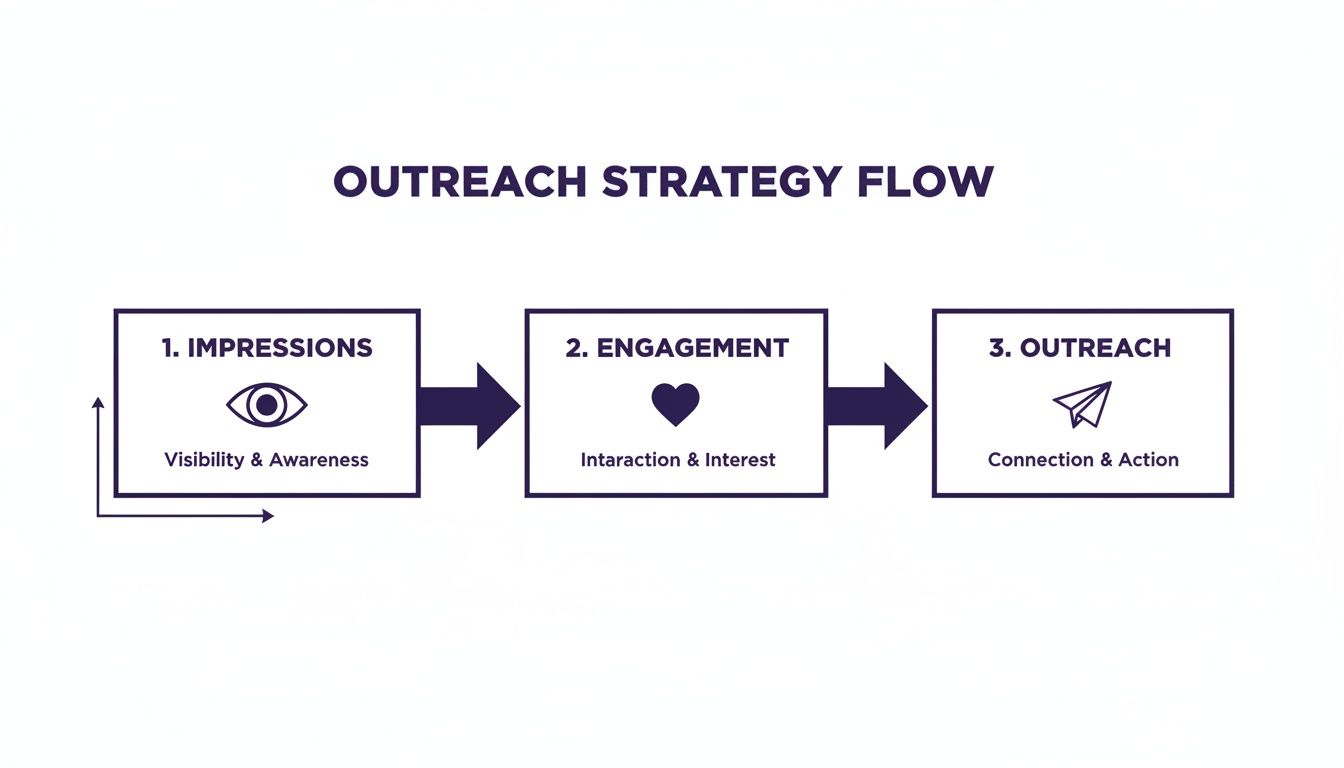
The takeaway is simple: outreach should never be random. It should be the logical final step after you’ve confirmed genuine interest through your analytics.
A Real-World SaaS Founder Scenario
Let's walk through a practical example. Imagine you’re a SaaS founder, and last week you posted a thread detailing a common pain point your product solves. You check your Twitter analytics account, and you see that thread blew up—it pulled in 200+ likes and a ton of replies.
Don't just pat yourself on the back for the vanity metrics. You've struck gold. The people who engaged with that thread are literally telling you, "I have this problem."
Here’s how you can turn that insight into a killer DM campaign:
- Find Your Hook: Identify that top-performing tweet.
- List Your Leads: Export the list of every user who liked and replied. These are your new warm leads.
- Write a Relevant Opener: Jump into DMpro and set up an automated campaign with a simple, contextual first message. Try something like, "Hey [Name], saw you liked my thread on [Topic]. Seems like it’s a huge headache for founders."
Founder’s Insight: The power here isn’t just in the automation; it’s using real data to make that automation feel incredibly personal and timely. You’re kicking off a conversation based on a shared interest they just showed you.
This simple workflow changes everything. Every piece of content that resonates becomes the launchpad for a new, highly targeted outreach campaign. You’re no longer just another cold DM in their inbox. You're starting relevant conversations with people who are already primed to listen.
This is, hands down, one of the most efficient ways to scale one-on-one conversations without sounding like a robot. If you're curious about the nuts and bolts, we've broken down how to set up automated direct messages on Twitter in another guide.
Following this process will skyrocket your reply rates. Why? Because you're reaching out with context. You’re not just some random account—you’re the person who just shared valuable insights on a topic they genuinely care about. That’s how you build a predictable lead pipeline on X.
When Things Go Wrong (And How to Fix Them)
Sooner or later, your X analytics account is going to act up. It’s inevitable. You’ll log in ready to dig into the data, only to find the dashboard won't load, or the numbers just look… weird. Don't worry, it happens to all of us, and the fix is usually pretty straightforward.
Most of the time, loading issues come down to your browser. A conflicting extension or a clogged cache is often the culprit. The quickest check is to open analytics in an incognito window. If it pops right up, you’ve found the problem. Just clear your browser cache or disable extensions one by one.
Another common frustration is data that doesn't add up, like a sudden nosedive in impressions. Before you start questioning your entire strategy, keep in mind that X's reporting can lag a bit. Give it 24 hours and check back. If the numbers still seem off, it might be time to look at any recent changes you’ve made to your posting schedule or content style.
Going Beyond the Dashboard
Once you're comfortable navigating the basics, it’s time to level up. The real magic happens when you stop relying solely on the built-in analytics and start manipulating the data yourself.
Get into the habit of exporting your data regularly. That little "Export data" button on your Tweet activity page is a goldmine. Download the CSV file and pull it into Google Sheets or Excel.
Founder’s Insight: Tracking your metrics in a spreadsheet is a game-changer. It lets you spot long-term trends that the standard 28-day view completely hides. You can finally see which content pillars consistently drive profile clicks over an entire quarter, not just a fleeting month.
This is how you shift from simply reacting to your last post's performance to building a genuine content strategy. Your decisions become rooted in months of hard data, which is exactly what you need to scale your SaaS distribution effectively.
Ethically Spying on the Competition
While you can't peek into your competitors' private analytics, everything they do in public is fair game. This is a simple, powerful way to find gaps in the market and sharpen your own content.
Start by creating a private Twitter list of your top 5-10 competitors. Make it a daily ritual to spend just a few minutes scrolling through this feed.
Here’s what you’re looking for:
- Unanswered Questions: What are people asking in their replies that they’re ignoring? That’s an open invitation for you to jump in and provide the answer.
- High-Engagement Hits: Notice any simple, low-effort tweets that got a ton of traction? These are great clues for quick content wins you can adapt for your own audience.
- Popular Themes: What topics do they return to again and again that always get people talking? This tells you exactly what your shared audience is passionate about.
Think of this as free, high-quality market research. You can use these observations to create content that directly addresses what your audience is searching for. When you combine this competitive intel with the warm leads from your own analytics, you create a powerful combo for your outbound campaigns in a tool like DMpro.
Your Path to Scalable Twitter Growth
<iframe width="100%" style="aspect-ratio: 16 / 9;" src="https://www.youtube.com/embed/s3EYOXmPR98" frameborder="0" allow="autoplay; encrypted-media" allowfullscreen></iframe>So, there you have it. You're now ready to turn your Twitter analytics account from a dashboard you glance at into a strategic asset. We've covered everything from getting access to your data, figuring out what actually matters for lead generation, and turning those numbers into powerful outreach.
The real secret isn't some hidden metric; it's consistency. By setting aside a little time each week to review your analytics, you create a powerful feedback loop. You post, you measure, you learn, and you get better. That's the engine of growth.
Final Thought: Stop guessing. Start making data-informed decisions that attract and convert your ideal customers right on Twitter. Every metric is a clue telling you how to win.
This is how you transform your X account from just a place to post content into a reliable lead generation machine. You understand what your audience truly wants, spot warm leads based on how they engage, and then reach out with perfect timing. This is how you scale real conversations and build a pipeline that works.
And if you're tired of the daily grind of sending DMs, you should check out DMpro.ai. It can automate your outreach and keep the conversations going, even while you sleep.
Got Questions? We've Got Answers
Here are a few common questions that pop up when founders start digging into their X analytics for the first time.
Can I Actually See Who Viewed My Profile?
The short answer is no. While X Analytics will show you how many profile visits you've had, it keeps the specific accounts anonymous. You can't see a list of who stopped by.
This is exactly why public engagement—likes, replies, and reposts—is your goldmine for lead generation. Think of profile visits as a helpful temperature check; a spike tells you a post is sparking curiosity. But your real, actionable leads are the people who raised their hands by publicly interacting with your content.
How Far Back Can I See My Data?
The native analytics on X typically only holds onto your data for the last 91 days. This is fine for checking recent performance but not great for seeing the bigger picture.
This is a huge reason why serious founders get into a rhythm of exporting their data every single month. By saving it to your own spreadsheet, you can build a historical archive. This lets you compare performance quarter-over-quarter or even year-over-year, giving you a much deeper understanding of what truly works long-term.
Are Third-Party Analytics Tools Worth the Money?
Honestly, it depends on where you're at. If you're just getting started, the free, built-in X analytics is more than enough. It gives you all the core metrics you need to find hot topics and identify warm leads without spending a dime.
But as your efforts grow, specialized tools can definitely give you an edge. For instance, a platform like DMpro doesn't just help you act on your data by automating DMs; it adds its own analytics layer. This helps you connect the dots between which content drove engagement and how well your outreach campaigns actually performed.
My advice? Master the free tool first. Once you've built a solid system for turning native analytics into tangible leads, you'll know exactly what you're missing and what features are worth paying for in a third-party tool.
If you’re tired of manually sending DMs every day, try DMpro.ai — it automates outreach and replies while you sleep.
Ready to Automate Your Twitter Outreach?
Start sending personalized DMs at scale and grow your business on autopilot.
Get Started Free