
Using Twitter Search Keywords to Find Your Next Customer
Learn to use Twitter search keywords to find high-intent SaaS leads. This guide covers advanced operators and outreach strategies for founders.
As a founder, you're constantly looking for an edge. Twitter is a goldmine for finding customers, but let's be real—mindlessly scrolling is a massive waste of time. The secret isn't more screen time; it's smarter searching.
Think of Twitter search keywords as your secret weapon. They're not just for finding hashtags. They're for building laser-focused queries that pull high-intent prospects right out of the noise. This is how you turn Twitter from a distraction into a lead generation machine for your SaaS.
Stop Scrolling, Start Selling

We've all been there. You know your ideal customers are on Twitter, but finding them feels like searching for a needle in a haystack. Your feed is a hurricane of noise, and hoping for a lead to fall into your lap just doesn't work.
But what if you could find someone the exact moment they complain about a problem your SaaS is built to solve? Or stumble upon a thread where your perfect buyer is asking for recommendations for a new tool?
That’s what happens when you master Twitter search keywords. It’s the difference between being a passive observer and an active founder who’s building a real pipeline.
Uncovering High-Intent Leads
The real goal isn't just to find people talking about your industry. It's to spot buying signals—the digital breadcrumbs people drop when they're actively looking for a solution.
You can learn to tune into the specific language of:
- Pain points: Founders tweeting about how frustrated they are with their current software.
- Tool requests: Spotting questions like "anyone know a good tool for X?" or "looking for a Mailchimp alternative."
- Competitor mentions: Finding users publicly airing their grievances with a rival product.
This approach builds a predictable stream of leads for your SaaS. With 500 million tweets flying around every single day, you have to get smart about how you search. It’s the only way to cut through the chatter and find the decision-makers ready to talk.
The key is to shift your mindset from content consumption to conversation hunting. Every search query should be designed to find a person, not just a topic.
This guide will walk you through exactly how to build these laser-focused queries. You'll go way beyond basic searches and learn to create a system that surfaces high-quality leads, day in and day out. This is a fundamental part of any serious founder's Twitter marketing strategy.
The best part? You don't have to run these searches and send DMs by hand. You can plug your most effective queries into a tool like DMpro. It automates the entire process, finding the right people and starting conversations for you, so you can focus on building your product.
Turn Search Into Your Personal Lead Magnet
Alright, this is where we graduate from simply tracking hashtags and start getting surgical. Think of Twitter's search operators as your secret weapons. They let you build search 'recipes' that filter out 99% of the noise and pull up only the high-intent conversations you want to join.
You don't need to read dense developer docs to get the hang of these. They're just simple commands you add to your search to tell Twitter exactly what you're looking for—not just keywords, but the context around them.
Finding Conversations That Matter
The whole point is to find tweets from specific types of people expressing a very specific need. You don't care about just anyone talking about "CRM." You want to find the founder who's publicly complaining that their current CRM is a clunky nightmare and is actively asking for alternatives. That's a lead.
This is where search operators become so powerful. You can combine them to create laser-focused searches that act like magnets for your ideal customers. If you're not crystal clear on who that is, taking a moment to build an ideal customer profile template will make your searches ten times more effective.
Now, let's dive into the operators I use all the time.
A Founder's Guide to Search Operators
You don't need to know all of them, just the ones that deliver the best results for lead gen. Here's a quick reference table with my go-to operators and how I use them.
| Operator | What It Does | Founder-to-Founder Use Case |
|---|---|---|
"exact phrase" | Searches for the exact sequence of words inside the quotes. | Finds buying intent, like "looking for a tool that". |
OR | Finds tweets containing either of the specified words. | Catches variations, like (recommendation OR alternative). |
- | Excludes tweets containing a specific word or operator. | Cleans up results: "social media tool" -job -hiring. |
() | Groups multiple terms or operators together. | Builds complex queries, like (saas OR tool) AND (founder OR startup). |
-filter:verified | Excludes tweets from verified (blue check) accounts. | A goldmine for finding real users, not just brands and media. |
min_faves:X | Shows tweets with at least 'X' number of likes. | Filters out low-engagement noise. I usually start with min_faves:5. |
This table covers the essentials. The real power comes from combining these to create a query that works like a finely tuned machine.
A single, well-crafted query is worth more than a dozen generic hashtag searches. It’s the difference between finding noise and finding opportunity.
Let's Build a Real-World Search Query
So, how does this look in practice? Let's build a query to find leads for a productivity SaaS. We want to find founders (who often use non-verified accounts) asking for tool recommendations, and we only want to see tweets with some decent engagement.
Here’s the query:
("any tool for" OR "recommend a tool") ("automation" OR "productivity") -filter:verified min_faves:5
Let's break down why this works so well:
("any tool for" OR "recommend a tool"): This targets the exact language people use when they're actively looking for a solution.("automation" OR "productivity"): This narrows the topic right down to our sweet spot.-filter:verified: This is a killer operator. It immediately cuts out most of the big brands and media outlets, leaving you with conversations from actual practitioners and founders.min_faves:5: This is a simple but effective quality filter. It ensures the tweet has at least five likes, telling us it's a real question with some visibility.
This one search string transforms Twitter into your personal lead generation engine. And the best part? You don't have to run it manually every day.
You can plug this exact query into an automation tool like DMpro. It runs 24/7 to find matching users and automatically starts personalized conversations for you. Imagine waking up to warm leads instead of a blank screen. That's the power of a good search query.
How to Pinpoint Your Best Customers on Twitter
Every founder has a picture of their ideal customer. You know their job, the tools they can't live without, and what keeps them up at night. The magic happens when you turn that profile into a set of Twitter search keywords that finds these people mid-conversation.
This is where we leave theory behind and get our hands dirty. Let's cook up some specific search queries for a few common SaaS buyer personas. We're not just looking for mentions; we're hunting for conversations that signal a real, immediate need.
Finding the Frustrated Growth Marketer
Picture this: you sell a slick new analytics tool. Your ideal customer is a growth marketer who is completely fed up with their current, clunky platform. They’re probably tweeting about it, asking their network for better options.
Your search query has to tap directly into that frustration.
- Searching for Pain Points:
("GA4 is so confusing" OR "hate Google Analytics") "anyone recommend" - Looking for Competitor Talk:
("Hubspot analytics" OR "Mixpanel") "alternative" -job -hiring - Catching Tool Requests:
("analytics tool" OR "attribution tool") "recommendation" -filter:verified
These aren't random searches. They're designed to find marketers who are practically raising their hands to buy something new. They’re not just chatting about their industry; they're actively looking for a solution right now.
Targeting the Scrappy, Bootstrapped Founder
Bootstrapped founders are always on the lookout for a good deal—tools that deliver massive value without a hefty price tag. You'll often see them using words like "affordable," "cheap," or "free alternative" when asking for recommendations.
Let's build a query that speaks their language.
("affordable" OR "cheaper") ("CRM" OR "email marketing tool") -filter:verified min_faves:3
This little gem combines cost-conscious terms with specific tool categories. We've also filtered out the noise from verified (often corporate) accounts and added a small engagement filter to focus on real conversations.
The fastest way to build a pipeline from Twitter is by combining pain-point language, competitor mentions, and direct requests for tool recommendations.
Reaching the Sales Leader Who Hates Their CRM
Sales leaders are not shy. When their CRM is a bottleneck for the entire team, you can bet they’ll be vocal about it online. This is a golden opportunity to slide into the conversation with a better way forward. Your search should target their exact complaints.
"Salesforce is so slow" OR "our CRM sucks"(Pipedrive OR Zoho) "alternative" lang:en"recommend a CRM for" (startup OR "small team")
These queries zero in on decision-makers at the precise moment they're feeling the pain. The context you get from their tweet is pure gold for personalizing your first message.
And people on Twitter are surprisingly open to this. 93% of users are actually open to brands joining their conversations, especially when it’s helpful. Just remember, 10% of users create 92% of all tweets, which means your searches can quickly surface the most active and influential people in your space. You can find more insights about Twitter user behavior here.
Once you’ve crafted these killer search strings, the last thing you want is to run them manually every day. This is the perfect time to plug them into an automation engine like DMpro.ai. It can take your saved search, find prospects who fit the bill, and start personalized DM conversations around the clock. It turns your smart search strategy into a lead generation machine that runs on its own.
Turning a Search into a Real Conversation

So, you’ve mastered your twitter search keywords and are finding all the right people. That’s a massive step, but it’s just the starting line. Now comes the hard part: starting a genuine conversation without sounding like another spammy bot.
Doing this manually is an absolute grind. You’re running saved searches every day, sifting through profiles, and trying to craft a unique DM for each person. It’s a huge time-sink for results that are, frankly, all over the place.
Building an Outreach Workflow That Scales
To do this effectively, you need a system. A scalable workflow isn't about working harder; it's about organizing your efforts so they compound over time. This means grouping your searches by persona, having a quick way to qualify someone, and knowing exactly what to say.
This is where smart automation becomes your secret weapon. The goal isn't to blast out generic messages. It's to automate the mind-numbing, repetitive tasks so you can pour your energy into the human side of the conversation.
A tool like DMpro.ai is built specifically for this.
Instead of manually running searches, you plug your most effective queries directly into the platform. DMpro then finds new people who fit your criteria 24/7 and kicks off personalized DMs for you. It turns your search strategy from a daily chore into a lead generation machine that runs while you sleep.
Writing DMs That Don't Get Ignored
The secret to a good opening line is simple: relevance. Your first sentence needs to show you've actually been paying attention. Ditch the hard pitch and start with the tweet that brought you to them.
Here are a few non-salesy ways to break the ice:
- Reference their question: "Saw you were asking about a new analytics tool. Have you checked out [competitor]? I’m actually building something new in that space and would love to get your take on it."
- Acknowledge their pain point: "Your tweet about how slow Salesforce is really hit home. We're building a much faster alternative specifically for small teams because of that exact problem."
- Offer genuine help: "Just saw your thread on productivity apps. If you're still exploring, I put together a quick list of my go-to's. No pitch, just figured it might be useful."
Notice a pattern? None of these are begging for a demo. They're adding value and starting a real dialogue. For a deeper dive, our guide on how to send a DM on Twitter has even more templates you can adapt.
The best outreach feels like a natural continuation of a public conversation. You’re not interrupting their day; you’re joining in with a relevant thought.
This is how you scale. You combine laser-focused searches with automated, yet deeply personal, outreach. It’s a system that lets you engage with hundreds of high-intent prospects every single week, freeing you up to focus on what really matters: building your product and closing deals.
How to Know If Your Twitter Searches Are Working
So you've built some fantastic search queries. That’s a great start, but are they actually finding the right people? As a founder, you live and die by data, not guesswork. It's time to figure out which of your Twitter search keywords are striking gold and which are just kicking up dust.
We're not talking about vanity metrics here. Impressions don't pay the bills. This is all about tracking the numbers that prove your outreach efforts are paying off.
Track the Metrics That Matter
Don't get lost in a sea of data. You only need to focus on a few key metrics to understand what’s working.
For each of your main search queries, start keeping an eye on these numbers:
- Response Rate: Out of all the DMs you send, what percentage of people actually write back? This is your north star.
- Positive Response Rate: Of those replies, how many are interested or at least open to a conversation? This tells you if you're hitting the right nerve.
- Qualified Leads Generated: How many of those positive conversations turn into someone you’d actually want as a customer? This is the bottom line.
A simple spreadsheet will do the trick. Create columns for your search query and these three metrics. Update it weekly, and you'll quickly spot the winners and losers.
If you want to go a bit deeper, you can also learn more about using Twitter analytics for your account to get a broader picture of your account's health.
A/B Test Your Way to Better Leads
Once you have a week or two of data, you've got a baseline. Now the fun begins. It's time to start optimizing your queries, just like you would A/B test a landing page.
Pick your best-performing search and create a slightly different version. You could try swapping one pain-point keyword for another, adding a negative keyword to filter out noise, or tweaking an operator like min_faves.
Let both versions run for a week. Then, compare the results. Which one brought in more qualified leads?
For instance, you might see that tweets with images get 150% more retweets. You could create a new query that specifically looks for people engaging with visual content in your industry. This simple tweak might uncover a completely different, and potentially more engaged, group of prospects. If you're looking for ideas, you can discover more stats on Twitter engagement to spark new tests.
Your search strategy should never be "set it and forget it." The most successful founders are constantly refining their queries based on what the data tells them. This is how you build a predictable, data-driven system for growth.
This process of continuous improvement is what separates the founders who get lucky from those who build a reliable sales pipeline. Over time, you'll develop your own set of proven search "recipes" that deliver high-quality leads every single week.
Once you find a winning query, it's time to pour some gas on it. That's where a tool like DMpro.ai comes in. It lets you set up multiple, automated campaigns based on your best-performing A/B tests. You can double down on what works and let the system handle the outreach, freeing you up from living in a spreadsheet all day.
Your Automated Lead Generation Engine
We've walked through the entire process, from pinpointing the right keywords to putting your outreach on autopilot. The biggest thing to remember is that Twitter is absolutely packed with high-intent leads—you just need a smart system to find them.
When you really get the hang of Twitter search keywords, you’re not just prospecting anymore. You're building a powerful, repeatable process that brings in fresh leads day after day. It's about trading in hours of manual searching for quality conversations with people who are actively looking for what you offer.
Think of it like building a machine. You've assembled all the parts; now it's time to fire it up and let it run. This simple loop shows exactly how to keep that machine fine-tuned.
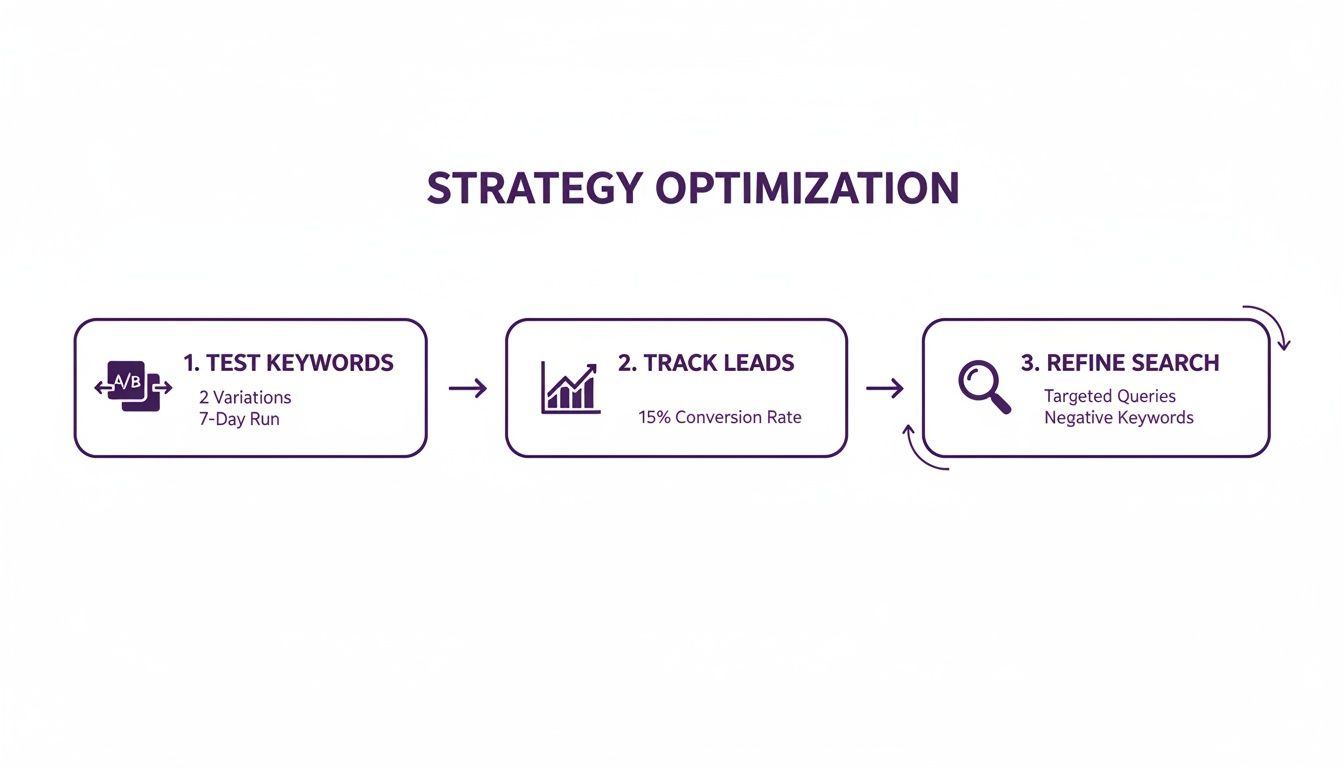
This cycle of testing, tracking what works, and refining your searches is the secret sauce. It’s what transforms a good strategy into a predictable lead-gen engine that you can count on.
The real goal here isn’t just to find a few leads. It’s to build a scalable system that consistently brings your ideal customers to you, freeing you from the daily grind of manual searches.
When you've dialed in your search queries and are ready to scale, that’s where a tool like DMpro becomes a game-changer. It takes your proven searches and automates the entire outreach workflow, from finding the right people to kicking off personalized conversations for you.
A Few Common Questions We Get
As founders ourselves, we've been in the trenches using Twitter for lead gen for years. Here are a few of the most common questions we get.
How Many Search Queries Should I Actually Run?
Start small and get laser-focused. It's far more effective to have 3-5 highly specific, high-performing search queries than 20 generic ones that just create noise. A good starting point is to build one solid query for each of your main buyer personas or a major pain point you solve.
Once you’ve nailed a query that consistently surfaces quality leads, then you can start creating variations. A workflow I love is plugging these proven searches into a tool like DMpro.ai. It lets you run multiple, targeted campaigns at the same time, so you can scale what’s working without getting lost in the weeds.
What's the Biggest Mistake People Make?
The single biggest mistake is being way too broad. Just searching for something like "#SaaS" is a recipe for disaster—you'll be buried under thousands of totally irrelevant tweets. You have to narrow it down.
Another classic error is forgetting to use negative keywords. Simple additions like -job or -hiring can instantly clean up your results and filter out the chatter.
And finally, a lot of people just give up too soon. Your first search query probably won't be a home run. The key is to keep tweaking and refining it based on the quality of the leads you see. It's a process of iteration.
Can I Really Automate Outreach Without Sounding Like a Robot?
Absolutely, but there's a catch. The secret is using smart automation, not just blasting out generic messages. The goal isn't to send 1,000 identical DMs; it's about making personal connections, just faster.
Modern AI tools are a game-changer here. A platform like DMpro can use personalization that references a person’s bio or recent tweets, making every message feel unique and relevant. Your saved twitter search keywords do the heavy lifting to find the right people, and the AI handles the one-to-one outreach. This is how you scale authentic conversations, not spam.
If you’re tired of manually sending DMs every day, try DMpro.ai — it automates outreach and replies while you sleep.
Ready to Automate Your Twitter Outreach?
Start sending personalized DMs at scale and grow your business on autopilot.
Get Started Free